


Data Security
Data Security focuses on protecting sensitive enterprise data across SAP production and non production landscapes. This category covers practical approaches to SAP data security including access control, data masking and scrambling, real time enforcement, governance, audit evidence, and regulatory compliance. Topics support organisations running SAP ECC and S/4HANA that need to reduce exposure, prevent misuse of copied data, and demonstrate enforceable security controls in day to day operations.
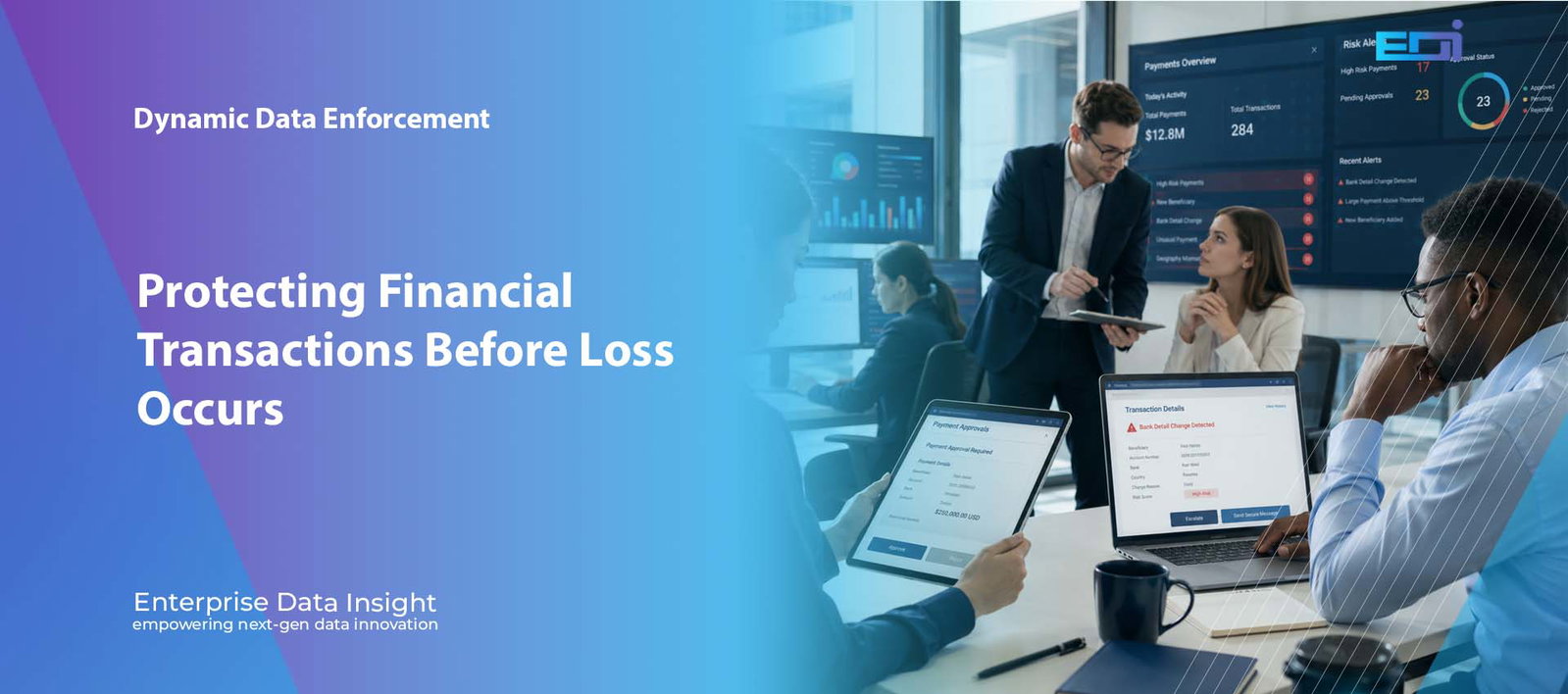
Finance & Treasury Control Room | Dynamic Data Enforcement Protecting Financial Transactions Before Loss Occurs SAP finance security should place the finance user at the centre of every policy decision. DDE evaluates the user, role, transaction, value, beneficiary, account, device, location, time and business sequence before allowing, reviewing or blocking sensitive financial activity. 1. User ActionA finance user changes, posts, approves or views sensitive information. 2. Business ContextDDE captures value, object, account, beneficiary and process sequence. 3. Access ContextIdentity, role, device, location, time and behaviour are evaluated. 4. Live DecisionThe policy returns allow, review, hold, mask or block. 5. EvidenceThe full reason and outcome are retained for finance and audit teams. Open the Finance Risk Lab Discuss Finance and Treasury Security Start with the user Choose the Finance Role You Want to Protect The risks and controls change depending on the user’s responsibility. This SAP finance security experience adapts to the selected persona. Treasury Analyst Payments, beneficiaries, bank accounts and liquidity operations. Accounts Payable Manager Vendor master changes, invoice payments and duplicate-payment controls. Finance Controller Manual journals, period-end activity, credit and pricing overrides. Risk, Audit or CFO Preventive SoD, privileged activity, evidence and financial exposure. Treasury Analyst — keep trusted payments moving DDE lets normal treasury activity continue while detecting unusual beneficiaries, changed bank accounts, high values, after-hours access and weak approval sequences. Priority controls High-value payments, beneficiary changes, dual approval and unusual working patterns. Hands-on user interaction Build a Finance Transaction and Let DDE Evaluate It Change the transaction, amount and access conditions. Then run the SAP finance security policy to see the live risk score, decision, reasons and evidence. Configure the request Trusted Payment Bank Change + Payment After-Hours Journal Create + Approve Financial activity High-value payment approvalVendor or customer bank-detail changeManual journal entryCredit-limit or pricing overridePayroll or sensitive financial reportEmergency or privileged finance access User role Approved finance or treasury userUser with broader-than-normal accessPrivileged or emergency user Transaction value £175,000 Managed device Trusted location Business hours Independent approval Recent bank change Duplicate or repeated action Evaluate with DDE 19 Risk score ALLOW Trusted payment can proceed The user, beneficiary, value, device, location, time and approval path match the approved treasury policy. User and roleApproved finance user operating inside assigned scope. Transaction and valueKnown payment type and value within the expected policy range. Access contextManaged device, trusted location and normal working hours. Business sequenceIndependent approval and no suspicious preceding change. CaptureUser, object, value and context recorded. CorrelateRelated bank, payment and approval activity linked. DecideRisk-based policy produces the control action. EvidenceDecision reason retained for audit and investigation. Evidence: approved role, known beneficiary, managed device, trusted location, business hours and independent approval. Topic-driven protection Explore the Finance and Treasury Risks DDE Can Control Select a topic to see the SAP finance security risk, the context DDE evaluates and the preventive action it can apply. 01Vendor Bank Account ChangesPrevent payment redirection after a high-risk master-data change. 02Customer Bank Detail ChangesProtect refunds, customer credits and remittance destinations. 03Payment-Term ModificationsControl changes that accelerate or redirect settlement. 04Manual Journal EntriesStop unusual postings before the ledger changes. 05High-Value Payment ApprovalsEvaluate value, beneficiary, approver and business sequence. 06Duplicate or Unusual PaymentsDetect repeated, split or unexpected payment behaviour. 07Credit-Limit ChangesPrevent uncontrolled increases in customer exposure. 08Discount and Pricing OverridesControl tolerance breaches and exceptional commercial terms. 09Payroll and Financial ReportsMask sensitive salary, bank and account data by context. 10Outside Normal Working PatternsRespond to unusual time, location, device and session activity. 11Same User Creates and ApprovesApply preventive SoD at the point of action. 12Emergency or Privileged AccessControl high-risk finance actions performed with elevated access. Vendor Bank Account Changes A vendor bank change may be legitimate, but it becomes high risk when it occurs from an unusual device, outside normal hours or shortly before an urgent payment. DDE evaluatesUser, vendor, old and new values, country, device, location, time, approval history and recent payments. Policy actionLock the new value, require independent verification, hold connected payments or block the change. EvidenceComplete bank-change and payment sequence retained for investigation. Preventive control point Where DDE Stops the Financial Loss Chain Traditional monitoring may detect the issue after posting or payment. SAP finance security with DDE places the decision before the damaging step. 1. Sensitive ChangeBank details, payment terms, credit limits or journal values are modified. 2. Related TransactionA payment, refund, posting or approval is initiated using the changed context. 3. DDE DecisionUser, value, access context and business sequence are evaluated in real time. 4. Preventive ActionThe action is allowed, masked, held, escalated, locked or blocked. 5. Evidence RetainedFinance, risk and audit teams receive the complete decision context. Finance and treasury perspective Why SAP Finance Security Must Be Context-Aware SAP finance security must address valid users performing legitimate transactions in an unsafe combination of circumstances. Valid Access Does Not Always Mean Safe Activity A finance user may be correctly authorised to maintain a vendor, post a journal or approve a payment. The risk appears when the action falls outside the expected business context, value, device, location, time or approval sequence. SAP finance security therefore needs to understand the difference between a valid identity and a safe financial action. DDE Evaluates the Complete Finance Context User identity, role, company code and organisational scope Transaction, account, beneficiary, value and currency Device, IP address, location, time and session behaviour Previous bank, payment-term, credit or pricing changes Preparer, approver and preventive SoD conditions Preventive SoD at the Moment of Action Traditional SoD reporting may identify role conflicts after access has been granted. DDE can prevent the same user from creating and approving the same transaction, changing a beneficiary and releasing payment, or combining privileged activities into one high-risk sequence. Protect Sensitive Finance Data Without Blocking Work DDE can mask payroll, bank, salary or account information when full visibility is not required. This lets users continue the business process while reducing unnecessary exposure to sensitive financial data. Allow Trusted Activity and Challenge Risk Context-aware SAP finance security does not need to block every high-value transaction. A legitimate payment can

Pause animation Dynamic Data Enforcement | SAP Supply Chain | Fraud Prevention SAP Supply Chain Security: Powerful Fraud Prevention with DDE SAP supply chain security must protect more than system access. It must understand who is changing a vendor, overriding a purchase order, modifying payment terms or approving a high-value transaction — and whether the exact business context makes that activity safe. Dynamic Data Enforcement (DDE) applies real-time, context-aware controls that can allow normal activity, restrict high-risk changes or block suspicious behaviour before operational or financial damage occurs. Protect Supplier Data Control changes to vendor master records, bank details, payment terms and sensitive supplier information. Control High-Risk Actions Apply stronger rules to unusual price overrides, emergency approvals, quantity changes and high-value purchase orders. Stop Fraud Earlier Block suspicious supply chain activity before an unauthorised change reaches payment, fulfilment or financial posting. The supply chain security question Should every authorised user be able to make the same supplier, purchasing and approval changes from every location, device and time of day? Vendor master protection PO controls Price override monitoring Preventive SoD Real-time blocking Explore Dynamic Data Enforcement Discuss Supply Chain Security V Vendor MasterProtect bank, address and payment-term changes. P ProcurementControl price, quantity and value overrides. A ApprovalsApply preventive SoD and stronger verification. E EvidenceCapture the full context behind every decision. Interactive DDE supply chain policy simulator One Supply Chain Process. Three Business Contexts. Three Policy Outcomes. Select a scenario or let the story play automatically. The business request, DDE policy evaluation, decision and audit evidence update together to demonstrate how SAP supply chain security can respond before risk becomes loss. Prev Replay Pause Guide Next Current scenario Trusted Purchase Order Live risk score 18 Low business risk Trusted user, supplier, device, value and time context. Story progression Request received Request DDE captures the user, supplier, transaction, field, value, device, location and timing. Evaluate The policy engine correlates isolated signals into one business-risk decision. Enforce DDE allows, restricts or blocks the action and creates investigation-ready evidence. Trusted Purchase Order Approved buyer, managed device, normal value and expected supplier relationship. Unusual Price Override A valid user increases price and quantity beyond the normal tolerance from a remote context. Vendor Bank Change After Hours Bank details are changed outside approved hours before an urgent payment request. 1. Business request received 2. Context and risk evaluated 3. Policy decision enforced Supply chain request Create Purchase Order User and role Senior buyer with approved purchasing responsibility. Supplier and process Established supplier and standard material purchase. Value and change £24,800 purchase order within approved tolerance. Location and device Trusted office network and managed corporate device. Time and sequence Normal working hours with no unusual preceding activity. Live context-aware policy decision Supplier Procurement Vendor Master Finance Identity: approved buyer Supplier: established Value: within tolerance Sequence: normal activity DDE Supply ChainPolicy Engine Correlates identity, supplier, value, location, time, transaction and business sequence. 18 Risk scoreLow Policy outcome Trusted Purchase Order — Allowed ✓ Allow and record The transaction matches approved purchasing behaviour and can continue without unnecessary friction. Purchase orderCreated normally Price and quantityWithin approved tolerance Supplier masterNo sensitive change detected Approval routeStandard workflow Evidence recorded: approved role, trusted device, expected supplier, normal value and standard working hours. Policy confidence 96% Scenario 1 — DDE keeps trusted purchasing activity moving A senior buyer creates a purchase order for an established supplier using a managed device during normal working hours. The value, materials and approval route match expected behaviour, so DDE allows the transaction and captures a complete evidence record. ✓ Business need: the buyer has a legitimate purchasing role and approved organisational scope. ✓ Risk context: the supplier, value, device and time are consistent with normal activity. ✓ Enforcement: the purchase order proceeds while DDE records the policy decision. Business Impact Process continuityMaintained Fraud exposureLow Control responseAllow Audit evidenceComplete Business request captured Purchase order request linked to user, supplier, value and device. Context correlated DDE confirms normal supplier, value, location and session behaviour. Decision and evidence Transaction allowed and a complete policy record is retained. Why SAP Supply Chain Security Needs More Than Roles and Workflow SAP roles and approval workflows remain essential, but they are often designed around broad entitlements and predefined process steps. A buyer may legitimately create purchase orders. A vendor administrator may legitimately maintain supplier records. An approver may legitimately release high-value transactions. The security challenge appears when a valid user performs an unusual action inside an otherwise authorised process. Strong SAP supply chain security must therefore examine the complete business context. A change may be routine when performed from a managed device, during normal hours, for an established supplier and within approved tolerance. The same change may be high risk when it involves a new bank account, an unusual country, a remote device, an urgent payment request or activity outside the user’s normal pattern. The key question is not only whether a user is authorised to perform a supply chain transaction. It is whether this exact action is safe in this exact business context. Where Supply Chain Risk Enters SAP SAP supply chain security connects supplier data, procurement, inventory, logistics, approvals and finance. That creates multiple points where a seemingly small change can produce a significant operational or financial consequence. Vendor bank details are changed shortly before a payment run. Purchase order prices or quantities are increased beyond normal tolerance. Payment terms are modified to accelerate settlement. Emergency or manual approvals bypass the expected control path. A new supplier is created and used immediately for a high-value transaction. Goods receipt, invoice and approval activity is performed by users with conflicting responsibilities. Sensitive supplier, pricing or contract data is viewed from an unusual location or device. How DDE Strengthens SAP Supply Chain Security Dynamic Data Enforcement strengthens SAP supply chain security by adding a real-time policy decision before a sensitive change is accepted or a high-risk action is completed. DDE does not rely on one isolated indicator. It can combine identity, role, supplier, transaction,
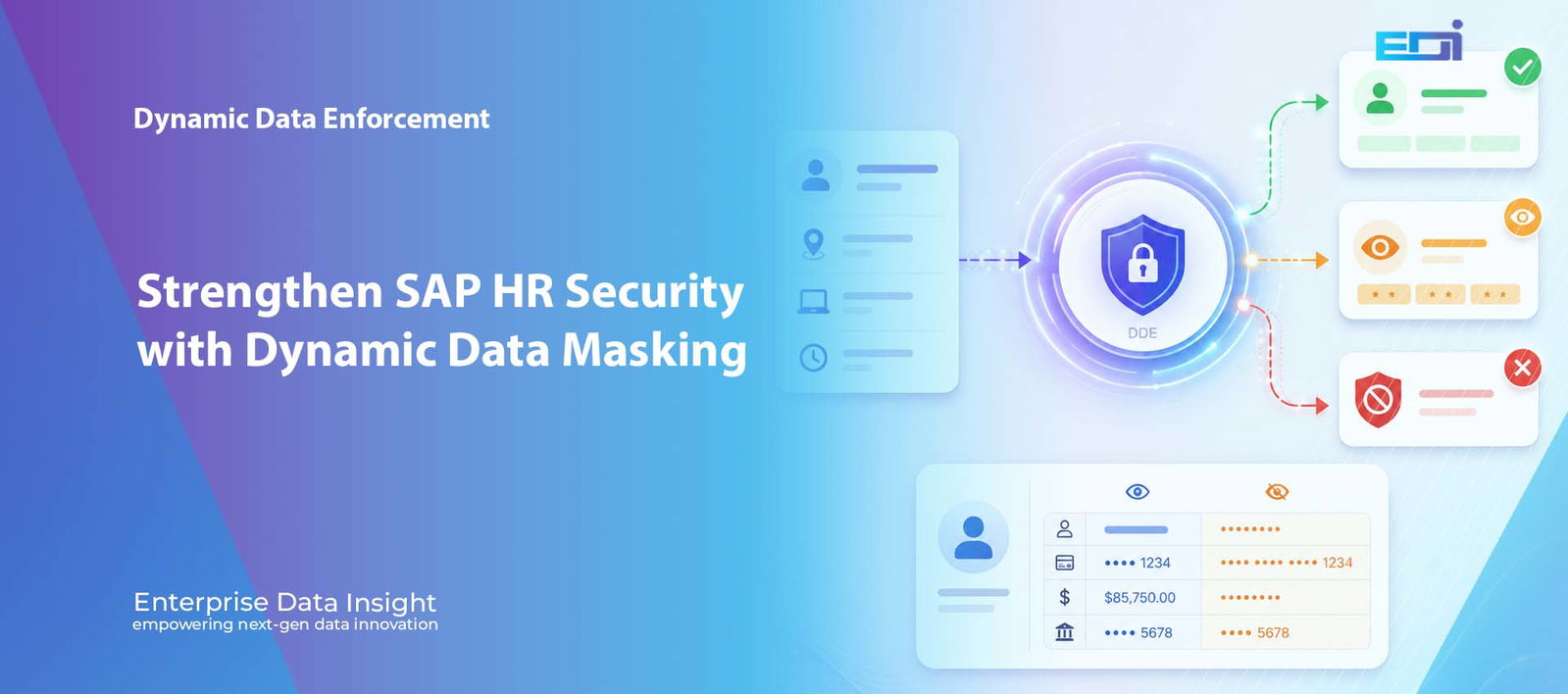
Pause animation Dynamic Data Enforcement | SAP HR Security | Context-Aware Access SAP HR Data Masking: Powerful Context-Aware Access Control with DDE SAP HR data masking is becoming essential because SAP HR systems contain some of the most sensitive information in the enterprise: employee identities, salaries, bank details, addresses, absence records and national identifiers. Traditional roles decide who may open a transaction, but they do not always decide what each user should see in the exact context of that access. Dynamic Data Enforcement (DDE) adds a real-time policy layer that can allow, mask, restrict or deny access according to the user, role, location, device, time, transaction, field and business purpose. One Transaction The same SAP HR transaction can return different results according to the live access context. Three Outcomes Authorised users may receive full access, masked access or a denied response. Source Unchanged Sensitive values are protected at runtime without altering the underlying HR master data. The HR security question Should every user with PA20 access see the same employee data, from every location, on every device and at every time of day? Field-level masking Context-aware access Allow / Mask / Deny Audit evidence Explore Dynamic Data Enforcement Discuss SAP HR Data Protection I IdentityUser, role, group and organisational scope. C ContextLocation, device, time and session behaviour. F Field ControlAllow, mask, block, lock or deny sensitive data. E EvidenceComplete policy decision and audit context. Interactive DDE policy story One PA20 Request. Three Contexts. Three Different Outcomes. Visitors can choose a scenario or let the story play automatically. This interactive SAP HR data masking experience updates the request context, DDE policy evaluation and returned HR data together without squeezing the experience into the article sidebar layout. Prev Replay Pause Guide Next Current scenario Trusted Office Access Live exposure score 16 Low exposure risk Trusted identity, device, location and approved working time. Policy progression Request received Capture the Request DDE identifies the user, role, transaction, protected fields, device, location and time. Evaluate the Context The policy engine correlates access conditions and determines the live employee-data exposure risk. Enforce the Decision DDE allows, masks or denies access and records the full policy evidence. Trusted Office Access Approved HR role, managed device, trusted network and normal working hours. Remote Location The identity is valid, but the remote context requires stronger field protection. After-Hours Request The request falls outside the approved HR data access policy window. 1. Request received 2. Context evaluated 3. Policy enforced Access request PA20 – Display HR Master Data User and roleHR payroll specialist · HR_MASTER_DATA LocationLondon office · trusted corporate network DeviceManaged endpoint · compliant security posture Time and session10:15 AM · approved working window Protected HR fieldsSalary · bank details · national ID · employee PII DDE policy engine active User & Role Location Device Time & Session Identity: approved Location: trusted Device: managed Time: approved DDE Context-AwarePolicy Engine Evaluates live business context before sensitive HR data is displayed. ALLOW MASK DENY 16 Exposure scoreLow Allow Authorised HR Data Is Displayed The user, role, device, location and time satisfy policy. PA20 remains available and approved employee information can be viewed. EmployeeSarah Collins Salary£58,400 Bank details20-45-67 / 45892136 National IDQQ 12 34 56 C Full access is permitted because the request matches the approved HR business context. Policy confidence 97% HR request captured PA20 request linked to the user, HR role, employee scope and protected fields. Access context verified Trusted network, managed endpoint and approved working time confirmed. Policy outcome recorded Authorised data displayed and the full policy evidence retained. Why SAP HR Data Masking Needs More Than Static Roles SAP roles remain essential. They determine which users can execute transactions and perform approved business activities. The challenge is that a role normally represents a broad entitlement. Once access is granted, the user may be able to see the same information regardless of where they connect from, which device they use, when they access the system or whether every sensitive field is required for the task. Effective SAP HR data masking adds the field-level precision that static roles cannot provide on their own. HR data creates a particularly difficult security problem because legitimate access and unnecessary exposure can exist inside the same transaction. An HR administrator may need PA20 to confirm employment status or organisational assignment. That does not automatically mean the user should always see salary, bank details, national identifiers or every other protected field. The key question is not only whether a user may open an SAP HR transaction. It is what that user should be allowed to see and do in the exact context of the request. Why Valid Credentials Can Still Create HR Data Risk Many sensitive HR incidents do not begin with an unknown attacker. They begin with a valid account, a legitimate transaction and access that is broader than the immediate business need. A user may be correctly authorised for PA20 while still accessing employee records from an unusual location, an unmanaged device, outside normal working hours or beyond the employee population assigned to that role. DDE distinguishes valid identity from safe access A successful login confirms who the user claims to be. It does not automatically prove that every requested field, employee record and access condition is appropriate. Context-aware SAP HR data masking closes that gap. The Limits of Traditional Access Control Traditional access control is designed around users, roles, authorisations and transactions. This works well for deciding whether a person may enter PA20, PA30 or another HR process. It is less precise when the organisation needs a different decision for individual fields, changing risk conditions or temporary business circumstances. A user may require the transaction but not every sensitive field displayed within it. The same access may be acceptable from a managed office network but higher risk from an unmanaged remote device. Normal working-hours access may be legitimate while unusual after-hours access requires stronger control. A payroll specialist may need salary and bank data while another HR role needs only organisational
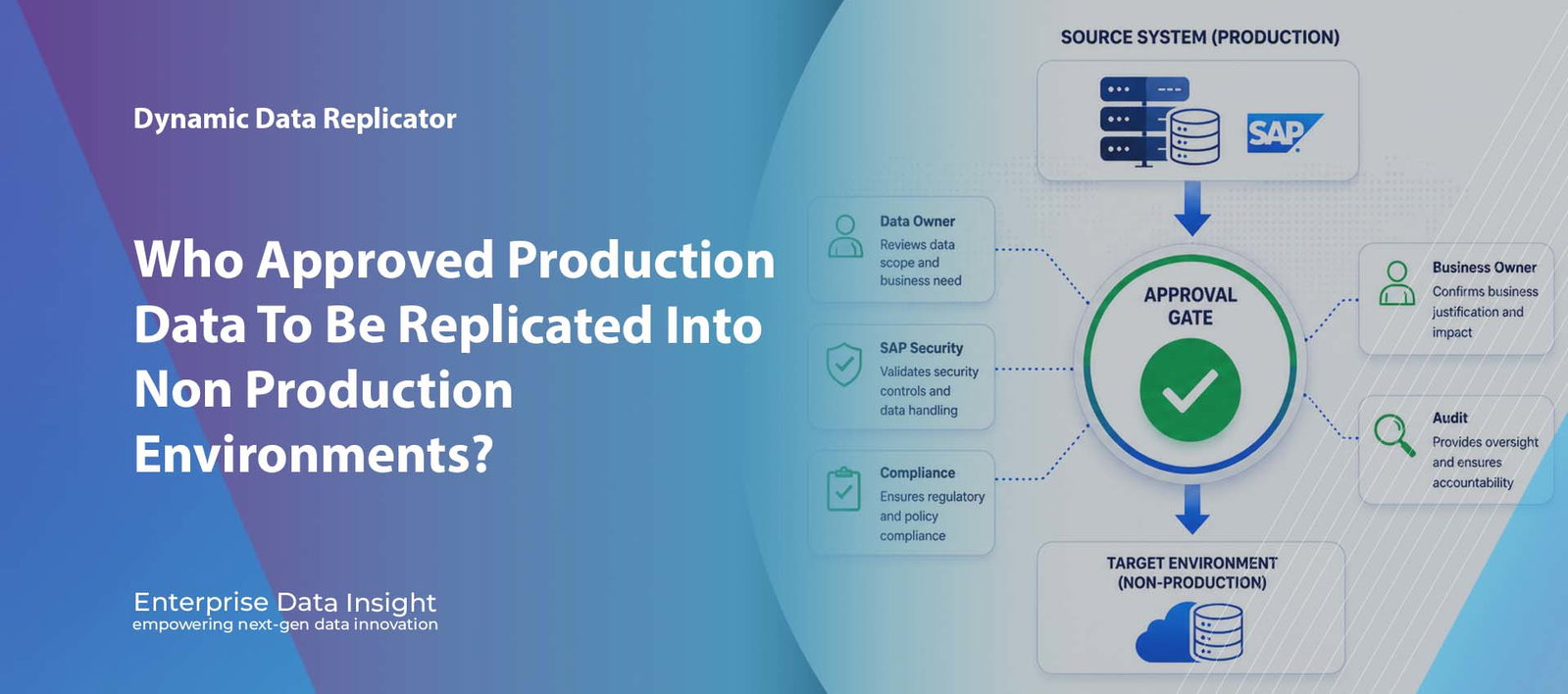
DDR Workflow Approval | SAP Data Governance | Audit Ready Replication Why Approval Before Data Replication Is No Longer Optional Workflow Approval for Data Replication is now a critical control for SAP organisations that move production data into test, development, migration, cloud, transformation, and non production environments. Dynamic Data Replicator introduces approval governance before export execution, ensuring every replication request is reviewed, authorised, documented, and auditable before data leaves the source system. No approvalNo export and no data movement until the required stakeholders have authorised the replication request. AccountabilityCapture who requested the data, who approved it, what scope was approved, and why it was required. Audit readyMaintain evidence of requests, approvals, rejections, comments, execution details, and governance decisions. Executive question The most important question is no longer whether data can be copied. It is who approved the data to leave the source system, and why. Data movement approvalSAP governanceAudit evidenceControlled replication Explore Dynamic Data ReplicatorArrange a DDR Demo Dynamic Data Replicator Workflow ApprovalWho Approved The Data To Leave Production?SOURCE SYSTEMProduction SAPCustomer, employee,financial, supplier, andcommercially sensitivebusiness data.APPROVAL GATENo Approval. No Export. No Data Movement.Replication requests are reviewed by authorisedstakeholders before DDR initiates export execution.Data Owner • SAP Security • Compliance • AuditTARGET SYSTEMControlled TargetTest, development,training, cloud, migration,or transformationenvironment.Govern. Approve. Replicate. Audit.DDR Workflow Approval ensures every data replication request is authorised, documented, and traceable before execution.Workflow Approval for Data Replication gives organisations governance over who approved production data movement, why it was required, and what scope was authorised. For many organisations, data replication has become a routine operational activity. Systems are refreshed, test environments are provisioned, SAP landscapes are migrated, and business data is transferred between environments on a regular basis. However, while organisations invest heavily in securing production systems, a critical governance question is often overlooked: who authorised the data to leave the source system? Many organisations have strong controls around user access, segregation of duties, and production changes, yet limited governance over the actual movement of data between systems. A user requests a refresh. A technical team executes the replication. Data is copied. But where is the approval, accountability, and audit trail? The Governance Gap in Data Replication Every replication activity represents a business decision, not simply a technical task. When data is replicated from a production SAP system into a non production environment, organisations may be transferring sensitive and business critical information. personally identifiable information customer data employee records financial information commercially sensitive transactions intellectual property supplier and partner information In many cases, the volume of data being transferred can be measured in terabytes. Yet organisations frequently lack a formal mechanism to ensure that the appropriate stakeholders have reviewed and authorised that movement. Workflow Approval for Data Replication closes this governance gap by making approval part of the replication process itself. Data Movement Is a Security Event Traditional security programmes focus on controlling access to systems. Modern organisations must also control the movement of data. A data export from a production system is effectively a security event. sensitive information copied to environments with weaker controls excessive data replicated without business justification GDPR and privacy obligations breached lack of accountability for data transfers limited audit evidence during compliance reviews increased exposure to insider threats The question should not only be whether the replication can technically be performed. The question should be whether it should be performed. Workflow Approval Built Into DDR DDR Workflow Approval introduces a governance layer that sits directly within the replication process. Before any export can begin, the replication request must pass through an approval workflow. The process is simple, controlled, and fully auditable. Request source system target system scope of data business objects selection criteria scrambling requirements business justification Review and approval data owners SAP Security teams Information Security compliance teams SAP Basis administrators project managers business process owners Approvers review the request and determine whether the data movement aligns with organisational policies and business requirements. Only after all required approvals have been completed can DDR initiate the export and replication process. No approval. No export. No data movement. Why Executive Teams Should Care For CIOs, CISOs, Data Protection Officers, and Audit Leaders, Workflow Approval delivers far more than operational control. It establishes governance over one of the most sensitive activities within the SAP landscape. Executive value of DDR Workflow Approval Workflow Approval for Data Replication strengthens security, compliance, audit readiness, and executive confidence in how SAP data is moved. GovernedEvery replication request is reviewed and approved before execution. Reduced RiskUnauthorised or unnecessary data transfers can be prevented before they occur. AccountableEvery decision is recorded, timestamped, and attributable to an individual approver. Audit ReadyRequests, approvals, rejections, comments, and execution details are maintained automatically. Supporting Regulatory and Compliance Requirements Organisations face increasing scrutiny regarding how sensitive information is accessed, processed, and transferred. Workflow Approval helps support compliance initiatives by enforcing governance directly within the replication platform rather than relying on emails, spreadsheets, or manual approvals. Organisations are under increasing pressure to demonstrate control over how sensitive data is transferred and processed. Frameworks such as GDPR, ISO 27001, and guidance from SAP continue to reinforce the importance of governance, accountability, and auditability across enterprise data movement processes. GDPR UK Data Protection Act ISO 27001 SOX internal audit programmes cyber security frameworks data governance policies From Technical Process to Business Controlled Process Historically, data replication has been viewed as a technical operation owned by IT teams. Leading organisations are now recognising that data movement is a business governed activity requiring oversight, accountability, and executive visibility. every request is reviewed every decision is documented every export is authorised every action is auditable DDR Workflow Approval transforms replication from a technical process into a controlled business process. The Future of Secure Data Replication As cyber threats increase and regulatory expectations continue to evolve, organisations can no longer afford to treat data replication as a routine background activity. The movement of production data into test, development, training, cloud, migration, or transformation environments must be governed with the same rigour applied to
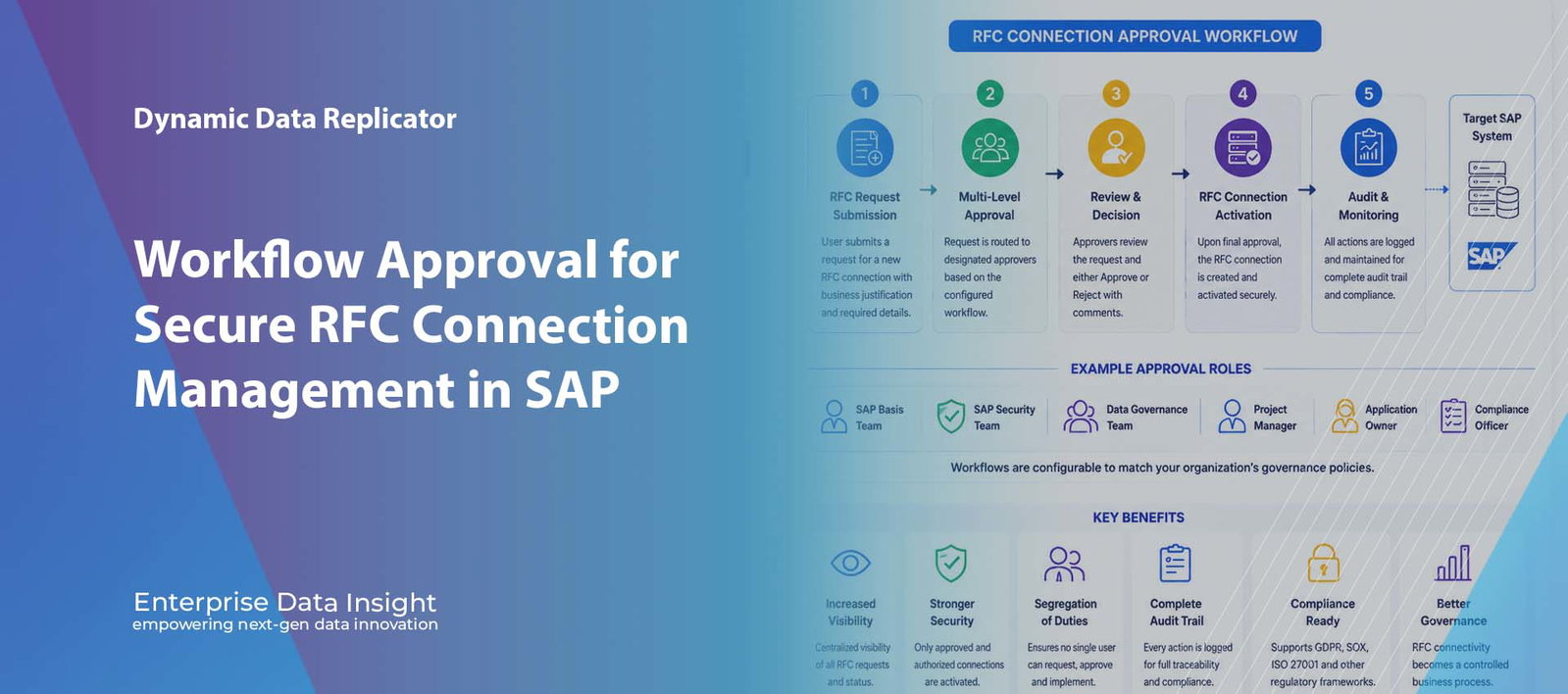
DDR Workflow Approval | Secure RFC Connection | SAP Governance Workflow Approval for Secure RFC Connection Management in Dynamic Data Replicator Workflow Approval for Secure RFC Connection management is now available in Dynamic Data Replicator, giving SAP teams a controlled and auditable way to request, approve, reject, document, and activate RFC connectivity. Instead of allowing technical connections to be created informally, DDR introduces approval governance, segregation of duties, compliance visibility, and complete audit traceability before SAP data replication activity begins. Controlled access RFC connection requests can be reviewed and approved before connectivity is activated. Full audit trail Capture who requested, who approved, what changed, and when the RFC connection was activated. Stronger governance Support SAP security, Basis, data governance, compliance, and project approval controls. What this solves technically DDR Workflow Approval turns RFC setup into a governed business process, helping organisations reduce unauthorised access risk and improve audit readiness. RFC approval workflow Segregation of duties Audit traceability Secure SAP connectivity Explore Dynamic Data Replicator Arrange a DDR Demo Secure RFC Governance in Dynamic Data Replicator Request, Approve, Activate, and Audit RFC Connections REQUEST Capture justification Record the source, target, environment, requestor, business reason, and access requirements before any connection is enabled. APPROVE Govern decisions Route RFC requests through Basis, Security, Data Governance, project, and compliance approval stages where required. CONTROL Enforce SoD Prevent requestors from approving their own access, restrict bypass activity, and keep SAP connectivity under formal oversight. AUDIT Trace every action Maintain evidence of submission, approval, rejection, changes, activation dates, and review comments. Secure data replication starts with secure connectivity DDR Workflow Approval helps SAP teams govern RFC connections before data movement begins Workflow Approval for Secure RFC Connection management helps SAP teams govern RFC access before replication, migration, refresh, or transformation activity begins. Workflow Approval for Secure RFC Connection management is becoming increasingly important for SAP organisations that rely on RFC connectivity for replication, migration, integration, and system refresh activity. Remote Function Call connections are often the technical foundation used to access and move data between SAP systems. When these connections are created without formal governance, organisations can face avoidable security, compliance, and audit risks. Why RFC Governance Matters More Than Ever RFC connections are used across many SAP activities, including selective data transfers, SAP ECC to SAP S/4HANA migration, non production refresh, test data provisioning, data transformation, and integration between SAP environments. Once created, an RFC connection can provide access to significant volumes of business critical and sensitive information. In many organisations, the process is still too informal. A user requests a connection, a technical administrator creates it, and the connection becomes available with limited documentation or approval history. This creates a gap between technical execution and business governance. limited visibility into who requested RFC connectivity weak approval controls before a connection is activated difficulty demonstrating compliance during internal or external audits increased risk of unauthorised access to sensitive SAP data insufficient segregation of duties between request, approval, and activation lack of documented business justification for data movement access RFC connectivity should not be treated as a simple technical configuration. It is a security gateway into SAP data and should be governed with approval, accountability, and audit evidence. What Is DDR Workflow Approval? DDR Workflow Approval introduces a controlled governance process for creating and managing RFC connections used within Dynamic Data Replicator. Rather than allowing RFC connections to be created and activated immediately, organisations can enforce approval workflows before connectivity is established. Every RFC request can be submitted, reviewed, approved, rejected, documented, and audited. This creates a secure and transparent operating model for SAP connectivity. users submit RFC requests directly through DDR approvers review the business justification and technical scope approval stages can reflect internal SAP governance policies connections are only activated after the required approval process is complete all workflow activity is recorded for audit and compliance review RFC Request Submission DDR allows users to submit requests for new RFC connections through a structured process. Instead of relying on informal emails, tickets, or undocumented conversations, the request captures the information needed to assess whether the connection is appropriate. Each RFC request can capture: source SAP system target SAP system business justification requestor information required access level environment details additional comments or supporting information This ensures every Secure RFC Connection request has a documented business purpose before any technical activation takes place. Multi Level Approval Workflows DDR supports configurable approval workflows that can be aligned with each organisation’s governance model. A simple project may require one approval stage, while a sensitive data movement process may require multiple levels of review. Approval paths may include: SAP Basis Team SAP Security Team Data Governance Team Project Manager Application Owner Compliance Officer Why approval matters formalises RFC access decisions reduces unauthorised connectivity documents business need and ownership supports compliance evidence on demand Who benefits SAP Basis and technical teams SAP Security and GRC teams data protection and compliance teams internal and external audit teams Segregation of Duties for Secure RFC Connection Control Segregation of duties is a critical control in secure SAP system management. DDR Workflow Approval helps ensure that the person requesting connectivity is not the same person approving the request, and that administrators cannot bypass the required approval route. The workflow can help organisations enforce: requestors cannot approve their own RFC connection requests administrators cannot bypass workflow controls without traceability security teams retain oversight of access related decisions audit teams can review request, approval, rejection, and activation history This reduces operational risk and supports stronger SAP governance across replication, migration, and refresh activity. Complete Audit Trail and RFC Traceability Every action within DDR Workflow Approval is recorded automatically. This gives organisations a clear audit history for each RFC request and helps demonstrate that connectivity was reviewed and approved before it became active. DDR maintains audit history for: who submitted the RFC request when the request was created approval and rejection actions comments entered during review RFC activation dates changes made to the connection user identification details
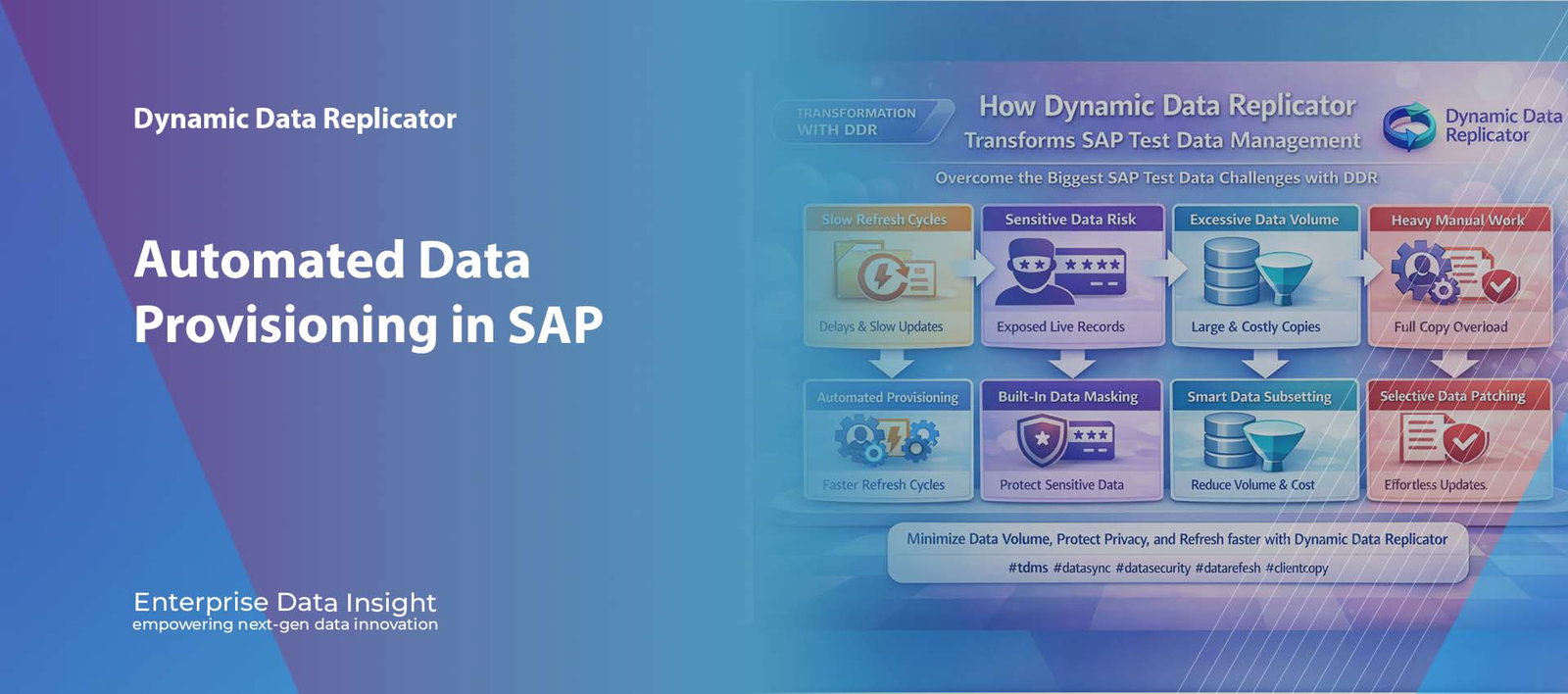
Automated Data Provisioning | Masking | Subsetting | Patching Automated Data Provisioning in SAP: How DDR Delivers Masked, Subsetted, and Ready to Use Test Data Faster Automated Data Provisioning in SAP is becoming essential for organisations that need faster test readiness, smaller non production systems, and better control over sensitive information. Traditional refresh methods often depend on heavy full copies, manual clean up, delayed masking, and large datasets that do not reflect the actual business scenario being tested. Dynamic Data Replicator changes this model by automating the delivery of relevant SAP data, applying masking during movement, supporting subsetting to reduce volume, and enabling selective patching where full refreshes are unnecessary. Faster readiness Provision SAP test data more quickly by automating delivery instead of waiting for full manual refresh cycles. Protected data Apply masking during provisioning so sensitive HR, customer, and financial records do not land raw in non production. Smaller targets Subset only the required business scope to reduce unnecessary data movement and system growth. What this solves technically DDR automates provisioning, integrates masking, supports data subsetting, and enables selective patching so SAP teams can deliver better non production environments with less delay and less risk. Automated provisioning Built in masking Data subsetting Selective patching Explore Dynamic Data Replicator Talk to Our Team Automated Data Provisioning in SAP How DDR Speeds Up Provisioning, Masking, Subsetting, and Patching PROVISION Automate delivery Move the required SAP business data into the target system without waiting for heavy full copy refresh cycles. MASK Protect sensitive data Anonymise HR, customer, vendor, and financial records during movement so non production data lands already protected. SUBSET Reduce data volume Move only the business scope needed for the test scenario to keep target systems leaner, faster, and cheaper. PATCH Refresh selectively Update specific objects or data groups without forcing a complete environment refresh every time. DDR helps SAP teams provision faster, protect privacy, reduce volume, and refresh more intelligently Built for SAP Test Data Management, selective replication, secure masking, subsetting, and ongoing environment patching Automated Data Provisioning in SAP with DDR helps organisations deliver faster, smaller, and safer non production environments. Automated Data Provisioning in SAP is about delivering the right dataset into the right environment without the delay and overhead of repeated full system copies. In many SAP landscapes, test environments depend on manual refresh processes that are slow, operationally heavy, and difficult to align with agile delivery timelines. When provisioning is automated, SAP teams can improve refresh speed, reduce manual effort, and deliver more relevant data to development, QA, sandbox, and training systems. Why Traditional SAP Data Provisioning Slows Delivery Traditional SAP test data preparation often relies on copying large production datasets into non production systems. While this can provide realism, it also creates problems. The refresh takes longer, the target system becomes larger, sensitive data is copied more widely than necessary, and manual clean up is often required after the copy is complete. This slows down project teams and makes every test cycle more expensive than it needs to be. long refresh cycles delay development and QA work large target systems consume more storage and support effort unnecessary business data is moved for small use cases sensitive records can be exposed in non production manual masking and clean up increase operational effort The ideal SAP provisioning model does not move everything. It moves only what is needed, protects it in flight, and makes it usable faster. What Automated Data Provisioning in SAP Changes Automated provisioning changes the operating model from heavy refresh dependency to controlled, repeatable delivery. Instead of treating every test cycle as a full environment event, SAP teams can provision selected data on demand and align data movement more closely to project need. This means organisations can: deliver relevant data more quickly reduce refresh frequency and scale avoid unnecessary copy activity support better test readiness across teams Built In Data Masking During Provisioning One of the most important advantages of a modern provisioning approach is that masking can be applied during the delivery process itself. Sensitive values do not need to land raw in the target system first. Instead, they can be anonymised in flight so the non production environment receives protected data from the start. This is especially important for: HR master and payroll related records customer and business partner information vendor and financial data personally identifiable or commercially sensitive values Why in flight masking matters reduces privacy exposure immediately removes post refresh clean up dependency keeps target systems safer by design supports compliant SAP test data delivery What masking preserves technical structure of the dataset realistic field formats and behaviours business usability for testing referential integrity across related objects Data Subsetting for Smaller and Faster Target Systems Data subsetting is a core part of efficient SAP provisioning. Not every project or test scenario needs a full production sized copy. In many cases, only a business relevant slice of data is required. Subsetting enables SAP teams to provision just the scope needed for the task, which helps reduce target system growth and improve performance. This matters because smaller target datasets are easier to manage, faster to refresh, and more practical for non production use. reduce unnecessary storage demand improve refresh speed deliver focused data for specific use cases support leaner development and QA systems Automated Patching and Selective Refresh Full refreshes are not always necessary. In many SAP projects, the team only needs to update a selected object, a particular business slice, or a defined set of records. Automated patching allows this type of targeted update without forcing the entire target environment to be recreated. This brings practical benefits for agile delivery and continuous testing because teams can update what matters rather than waiting for another large refresh event. refresh selected business objects only reduce disruption to ongoing testing support faster turnaround between cycles improve flexibility in non production management Where DDR creates measurable value The value of automated provisioning is not just speed. It comes from delivering smaller, safer, and
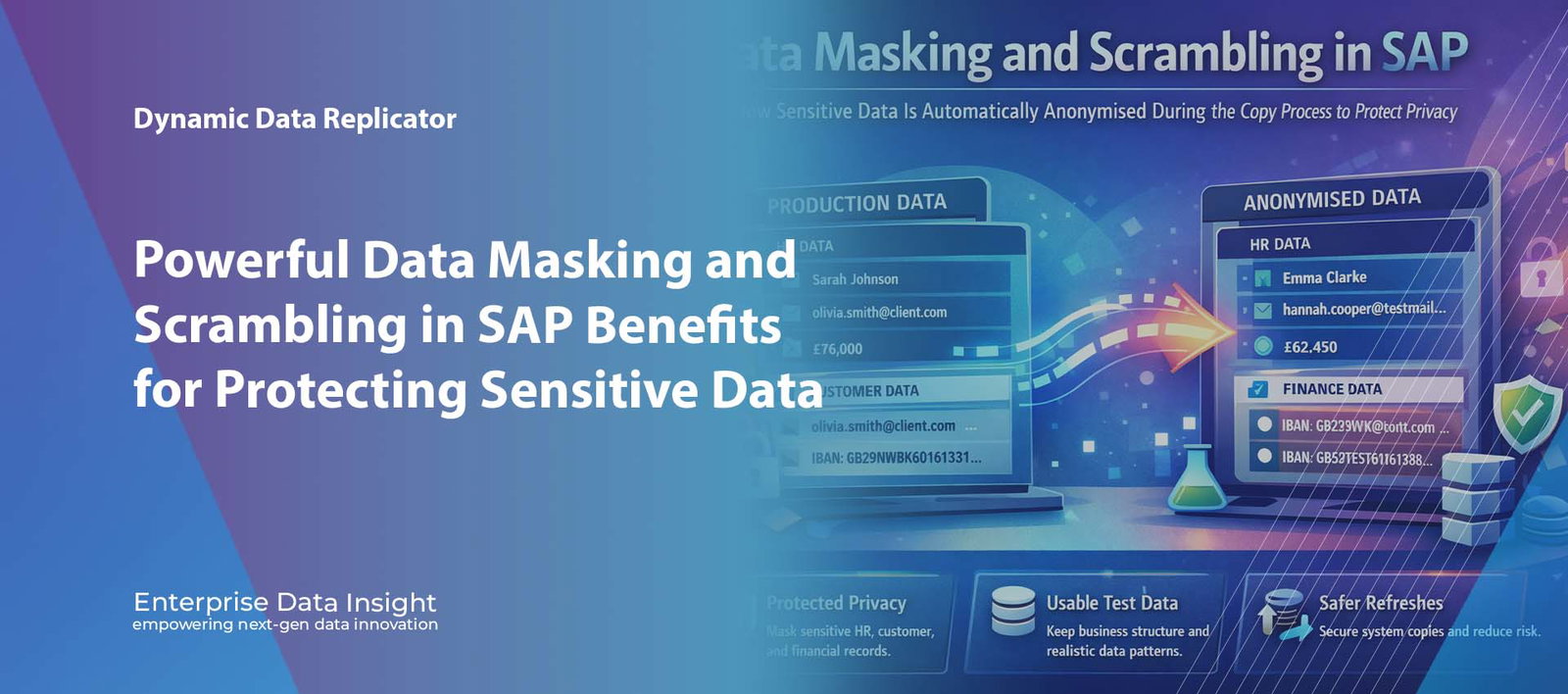
Data Masking | Data Scrambling | SAP Privacy Protection Data Masking and Scrambling in SAP: How Sensitive Data Is Automatically Anonymised During the Copy Process to Protect Privacy Data Masking and Scrambling in SAP are essential for organisations that need realistic business data in non production environments without exposing live employee records, customer information, vendor details, payroll values, contact data, or financial identities. During a copy, refresh, or selective replication process, sensitive information can be anonymised automatically so project teams can test, train, validate, and innovate safely. Dynamic Data Replicator supports this approach by embedding Data Masking and Scrambling in SAP directly into the copy process, protecting privacy while preserving business structure, referential integrity, and technical usability. Protected privacy Mask sensitive HR, customer, and financial records before they reach QA, development, sandbox, or training systems. Usable test data Preserve business structure, relationships, and realistic data patterns so functional testing still works properly. Safer refreshes Reduce unnecessary exposure of live production data during every system copy, refresh, or replication activity. What this solves technically DDR helps SAP teams anonymise sensitive values during the copy process, reduce privacy risk in non production systems, and keep data technically useful for realistic business testing. Sensitive data protection Data masking Data scrambling Secure SAP copies Explore Dynamic Data Replicator Talk to Our Team Data Masking and Scrambling in SAP Protect Sensitive Data During Every System Copy HR DATA CUSTOMER DATA FINANCE DATA Before Name: Sarah Johnson DOB: 14/03/1988 Email: sarah.johnson@company.com Salary: £76,000 After Name: Emma Clarke DOB: 21/07/1987 Email: emma.clarke@testmail.local Salary: £62,450 Before Customer: Olivia Smith Email: olivia.smith@client.com Phone: +44 7700 123456 Address: London After Customer: Hannah Cooper Email: hannah.cooper@testmail.local Phone: +44 7700 884521 Address: Birmingham Before IBAN: GB29NWBK60161331926819 Account: 45671234 Payee: Jane Miller Type: Live banking data After IBAN: GB52TEST60161388451273 Account: 91386420 Payee: Claire Hudson Type: Scrambled banking data Sensitive fields anonymised while preserving technical and business value Built for secure SAP testing, training, refreshes, and selective replication Data Masking and Scrambling in SAP help organisations protect privacy while keeping copied data functionally useful in non production environments. Data Masking and Scrambling in SAP provide a practical and secure way to use realistic business data in non production systems without exposing live personal or confidential information. Instead of copying raw production records into development, QA, sandbox, or training environments, sensitive fields can be anonymised automatically during the copy process. This means teams still work with meaningful data, but the privacy risk of exposing real employees, customers, vendors, or financial identities is significantly reduced. Why Unmasked SAP Copies Create Privacy and Security Risk In many SAP landscapes, production data remains the most useful source of test data because it reflects genuine business relationships, process flows, and organisational complexity. However, copying production data into non production systems without protection introduces serious privacy and security risks. These target systems often have broader access, lower controls, and wider visibility across technical teams, project teams, consultants, and support users. This creates a situation where data that was originally controlled in production becomes far more exposed outside production. HR records may include names, addresses, dates of birth, payroll values, tax identifiers, and personal contact details. Customer records may include names, emails, phone numbers, delivery addresses, and account histories. Financial data may expose bank details, payment references, and commercially sensitive transactions. The result is predictable: sensitive information is copied into systems where it is not needed in live form non production environments become an avoidable privacy risk security teams must manage larger exposure surfaces project teams test against live personal data unnecessarily governance and compliance pressure increase across the landscape In SAP, this is not simply a compliance concern. It is also an operational design problem. If sensitive data can be anonymised during the copy process, there is no reason for raw live values to appear in downstream systems at all. The safest SAP test data is not data that is hidden after the copy. It is data that arrives in the target system already protected, already anonymised, and already fit for secure use. Why Data Masking and Scrambling Matter in SAP Landscapes Data masking and scrambling matter because SAP systems are deeply interconnected. Test scenarios rarely depend on isolated rows from one table. They depend on business objects, document flow, organisational context, master data dependencies, transactional history, and related records across modules. If organisations simply delete sensitive fields or remove too much data, the test value drops sharply. If they copy everything raw, the privacy risk becomes unacceptable. The answer is controlled anonymisation. This means sensitive values are changed while the technical and business usefulness of the dataset is retained. A name can still look like a name. An email address can still behave like an email address. A bank account number can still match expected structure. A business partner can still remain linked across related objects. Good masking protects the identity without breaking the process. This matters especially for SAP teams that rely on realistic testing for integrations, end to end processes, user acceptance, support simulations, and training. The stronger the dataset quality, the better the downstream validation. The stronger the masking quality, the lower the privacy exposure. Technical weaknesses of unmasked copies expose live personal data in non production systems increase privacy and security risk unnecessarily create governance concerns during refresh cycles expand the scope of sensitive data access make downstream systems harder to justify from a privacy perspective Practical value of masking and scrambling protect identities while keeping data useful support realistic end to end testing reduce exposure of HR and customer information improve trust in non production data operations strengthen the security posture of SAP refresh activity How Data Masking and Scrambling Work During the Copy Process The most effective approach is to apply masking and scrambling rules during the copy, refresh, or replication activity itself. Instead of moving raw production values first and cleaning them afterwards, the transformation happens as part of the controlled data movement process. This reduces risk and simplifies operations because
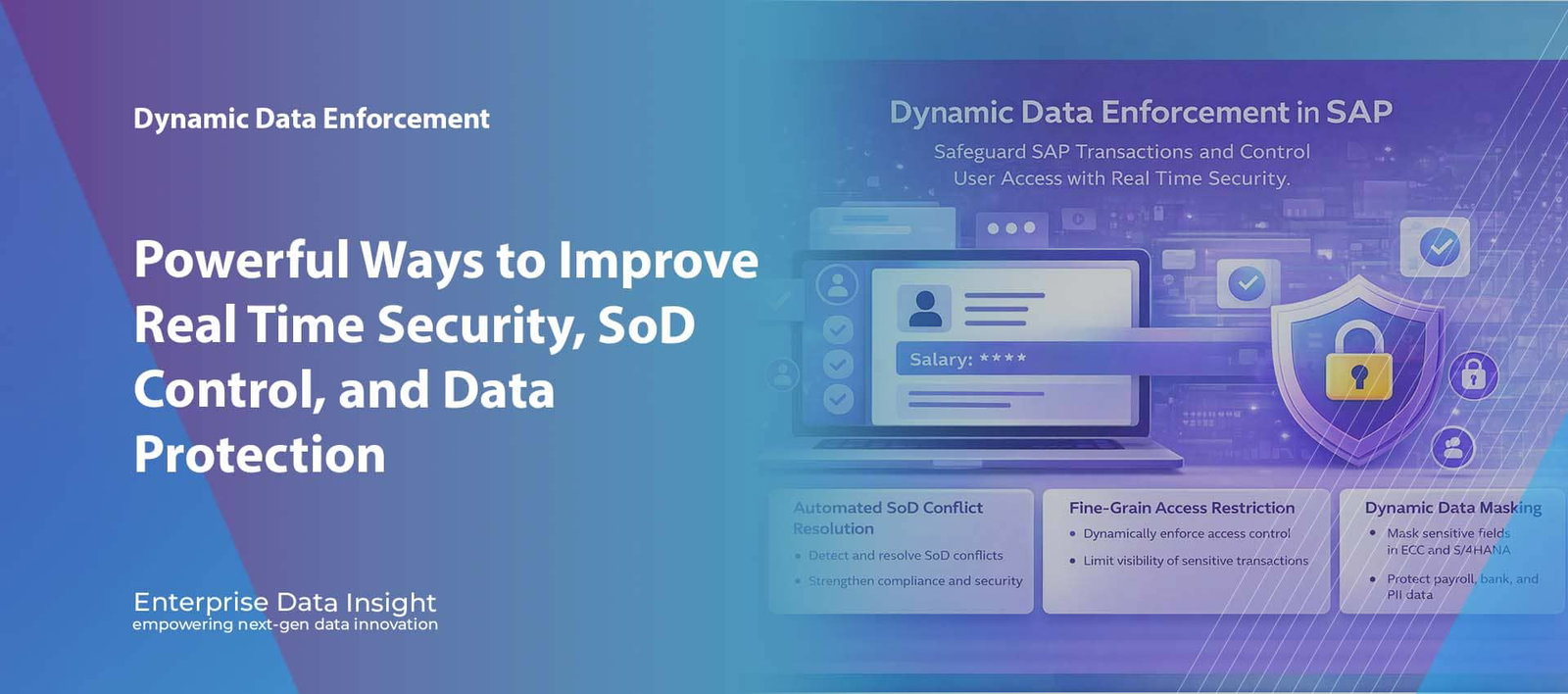
SAP Security | Real Time Enforcement | Data Protection | Access Governance Dynamic Data Enforcement in SAP: 7 Powerful Ways to Improve Real Time Security, SoD Control, and Data Protection Dynamic Data Enforcement in SAP gives organisations a single security platform to reduce access risk, business process exposure, and data privacy gaps across both ECC and S/4HANA. Dynamic Data Enforcement in SAP replaces slow, fragmented, and reactive control models with continuous policy enforcement, behavioural visibility, context-aware decisioning, and fine-grain runtime control at the exact moment a user attempts to access or process data. This creates a stronger operating model for zero trust access, least privilege, policy orchestration, segregation of duties governance, transaction surveillance, and dynamic data protection at enterprise scale. Reduce access risk Automate high-risk access controls, resolve SoD conflicts faster, and reduce over-authorised user footprints across SAP landscapes. Protect sensitive SAP data Mask any SAP field dynamically in ECC and S/4HANA without changing the underlying business process or degrading usability. Strengthen business process control Continuously monitor transactions, intercept policy violations, and apply fine-grain controls before risky activity becomes an incident. Unify governance in one platform Bring SoD management, access certification, provisioning, de-provisioning, monitoring, and data masking into a single enforcement model. Dynamic Data Enforcement in SAP gives SAP security teams a runtime policy enforcement layer that can monitor, control, protect, and govern access continuously across critical business processes. It is designed for organisations that need stronger resilience, better compliance posture, tighter access governance, and real time control over sensitive business data and privileged user behaviour. Before Static roles with accumulated access debt Manual SoD analysis and delayed remediation Periodic reviews with weak follow through Sensitive fields visible to broad user groups During Continuous transaction monitoring and policy checks Context-aware runtime decisioning Dynamic masking and fine-grain access restriction Automated certification and lifecycle control After Lower access exposure and cleaner entitlements Reduced business process risk and audit findings Stronger privacy controls for regulated data Higher confidence in SAP security operations Dynamic Data Enforcement in SAP Matters for Modern SAP Security Dynamic Data Enforcement in SAP matters because most SAP environments still rely heavily on traditional role based access control, supported by scheduled reviews and retrospective audit checks. That model was built for a very different era. Today’s SAP landscape is more distributed, more integrated, more exposed to internal and external threat vectors, and far more dependent on timely governance decisions. ECC and S/4HANA systems process payroll, finance, procurement, vendor, customer, and operational data that cannot simply be secured by broad roles and occasional certification exercises. The problem is not only who has access. The deeper problem is how that access is used, when it is used, what data is being viewed, whether the user context is appropriate, and whether the transaction path introduces fraud, privacy, or control risk. Dynamic Data Enforcement in SAP closes that gap by pushing governance closer to runtime execution. It gives security and compliance teams the ability to enforce policies continuously rather than discovering exposure long after the fact. Dynamic Data Enforcement in SAP turns SAP security from a static entitlement model into a live control framework built around continuous monitoring, policy orchestration, least privilege, runtime masking, and adaptive governance. What the Dynamic Data Enforcement in SAP Security Platform Includes Enterprise Data Insight positions Dynamic Data Enforcement in SAP as a consolidated security platform, not a fragmented collection of point controls. The platform combines multiple control domains that are usually handled separately, enabling a more coherent and more scalable governance architecture across the SAP estate. Automated SoD Conflict Resolution Traditional segregation of duties control is often retrospective, spreadsheet driven, and too slow to reduce active business risk. Dynamic Data Enforcement in SAP introduces automated SoD detection and response so that high-risk combinations can be identified, escalated, and remediated with greater speed and precision. This improves preventive control coverage across finance, procurement, vendor maintenance, payments, master data, and other sensitive process chains. Automated Periodic Review of Access Certifications Access certification should not be a disconnected compliance exercise. The platform automates recurring certification workflows, improving entitlement visibility, reviewer accountability, decision traceability, and audit readiness. It helps organisations challenge legacy access, remove entitlement drift, and maintain stronger alignment between business responsibility and granted permissions. Automated User Provisioning and De-Provisioning Across Applications Manual user lifecycle management creates inconsistency, delay, and orphaned access. Dynamic Data Enforcement in SAP automates provisioning and de-provisioning across application boundaries, helping to enforce joiner, mover, and leaver controls with stronger consistency. This is especially valuable in complex enterprise environments where SAP access must stay synchronised with business roles, organisational changes, and connected platforms. Continuous Transaction Monitoring and Fine-Grain Access Control The platform continuously monitors SAP transactions to identify suspicious, abnormal, or policy-sensitive activity as it happens. Combined with fine-grain access control, this enables highly targeted enforcement down to the transaction, field, object, or contextual level. Security teams can therefore move beyond coarse role restrictions and apply control logic that is more intelligent, more adaptive, and more aligned with actual business risk. Dynamic Data Masking of Any SAP Field in ECC and S/4HANA Sensitive data protection in SAP is often binary. Either a user sees the full value or they are blocked entirely. Dynamic Data Enforcement in SAP changes that model by allowing controlled visibility of specific fields based on role, context, policy, and business need. Any SAP field can be masked dynamically in ECC and S/4HANA, which is critical for protecting payroll, bank data, personally identifiable information, health related data, commercial pricing, and other sensitive values. Single Platform Governance Model The real strength of the platform is consolidation. Instead of operating separate tools for SoD, access reviews, lifecycle management, monitoring, and masking, organisations can enforce security through a single control framework. That reduces control fragmentation, improves operational efficiency, and creates stronger alignment between security operations, audit, compliance, and SAP application teams. How Dynamic Data Enforcement in SAP Delivers Technical Architecture and Control Depth From a technical standpoint, Dynamic Data Enforcement in SAP introduces an enforcement layer
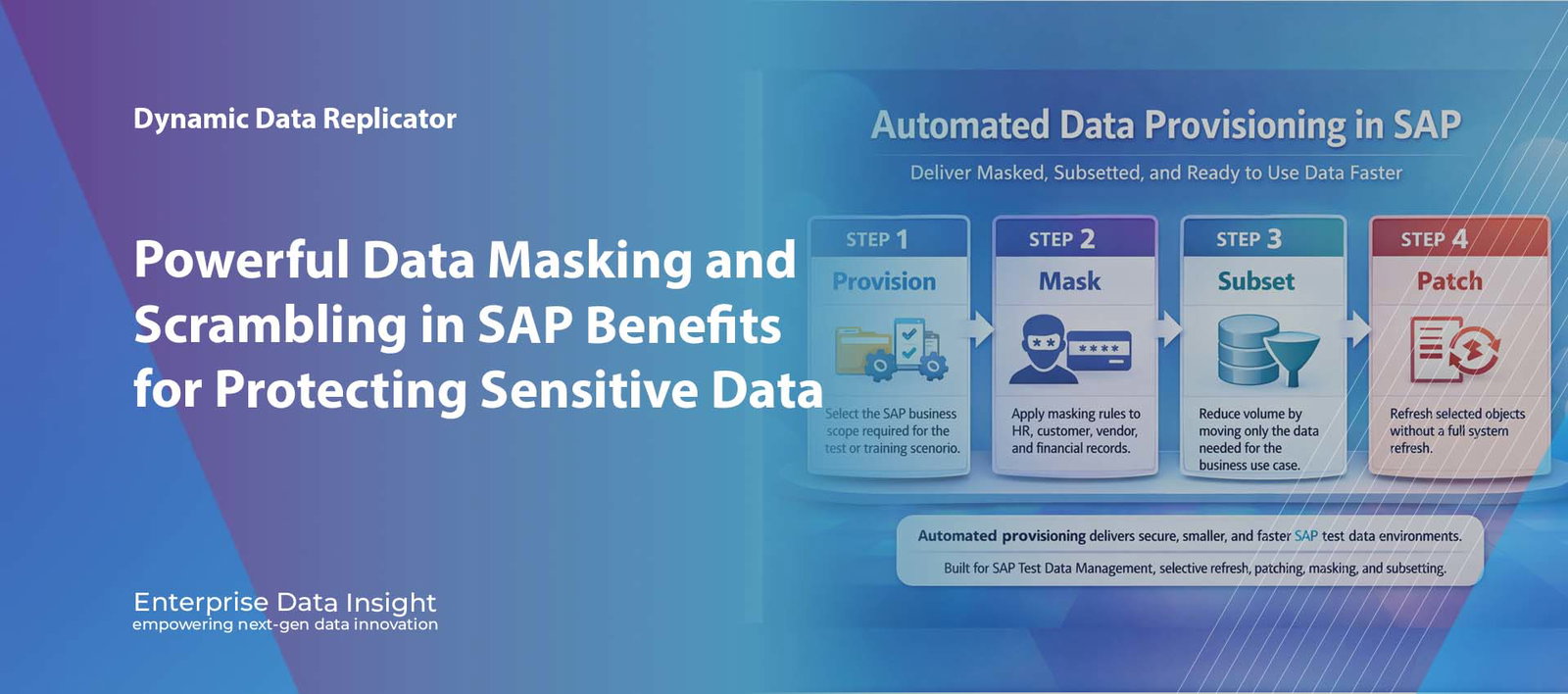
Automated Data Provisioning | Data Masking | Data Subsetting Automated Data Provisioning in SAP: How Masking, Subsetting, and Patching Deliver Faster and Safer Test Data Automated Data Provisioning in SAP is changing how organisations prepare non production systems for testing, training, development, and project delivery. Instead of waiting for manual system copies, large refresh cycles, and post copy clean up activities, SAP teams can now automate the movement of the right data into the right environment at the right time. When this process includes data masking, data subsetting, and automated patching, the result is faster refresh readiness, reduced privacy risk, smaller target systems, and much more efficient SAP Test Data Management. Faster delivery Automate data provisioning so environments are ready sooner without waiting for full system copy cycles. Smaller targets Use data subsetting to reduce volume and deliver only the business data required for the scenario. Safer data Apply data masking during provisioning so sensitive information is anonymised before it reaches non production. What this solves technically Automated provisioning reduces dependency on full refreshes, supports selective updates, enables controlled masking, and keeps SAP data usable for testing while lowering operational effort. Automated provisioning Data masking Data subsetting Object patching Explore Dynamic Data Replicator Talk to Our Team Automated Data Provisioning in SAP Deliver Masked, Subsetted, and Ready to Use Data Faster STEP 1 Provision Select the SAP business scope required for the test or training scenario. STEP 2 Mask Apply masking rules to HR, customer, vendor, and financial records. STEP 3 Subset Reduce volume by moving only the data needed for the business use case. STEP 4 Patch Refresh selected objects without a full system refresh. Automated provisioning delivers secure, smaller, and faster SAP test data environments Built for SAP Test Data Management, selective refresh, patching, masking, and subsetting Automated Data Provisioning in SAP combines provisioning, masking, subsetting, and patching to deliver usable and protected non production data faster. Automated Data Provisioning in SAP is no longer just about copying large volumes of data from one system to another. Modern SAP teams need a faster and more controlled way to prepare development, QA, training, and sandbox environments without relying on full system refreshes. When provisioning is automated, business relevant data can be delivered with less delay, less manual effort, and less unnecessary volume. When that process also includes masking, subsetting, and patching, the quality and usability of the resulting environment improve significantly. Why Traditional SAP Data Provisioning Slows Delivery Traditional SAP data provisioning is often based on full system copies or large refresh activities. While these approaches deliver complete data, they are usually slow, heavy, and inefficient. They move everything, including data that adds no value to the target scenario. This increases system size, extends refresh duration, and creates unnecessary operational work before the environment is usable. It also introduces a major security and privacy issue. Sensitive HR, customer, vendor, and financial data is frequently copied into non production systems that do not need to hold raw live values. long refresh windows delay projects and releases large data volumes increase target system footprint manual post copy clean up slows test readiness sensitive data is exposed in non production teams cannot easily provision scenario specific data The more data you move than you actually need, the slower, larger, and riskier the SAP provisioning process becomes. What Automated Data Provisioning in SAP Changes Automated Data Provisioning in SAP changes the model from bulk movement to controlled delivery. Instead of copying complete clients or full productive datasets, organisations can define the data they need and automate how it is prepared for the target system. This approach allows teams to provision environments with data that is: relevant to the specific test or business process masked where sensitive data exists subsetted to reduce size and overhead patched or refreshed selectively without full re-copy The result is faster environment readiness, lower database growth, and greater control over how SAP test data is managed across the landscape. Data Masking Built Into Provisioning One of the strongest benefits of automation is the ability to apply data masking during the provisioning process itself. This means sensitive values are transformed before they reach the non production environment rather than being copied raw and cleaned later. For example, employee personal details can be anonymised, customer email addresses can be converted to safe values, and financial records can be scrambled while retaining technical structure. What masking protects HR names, dates of birth, salary values customer identities and contact information vendor and business partner details financial and banking information Why built in masking matters reduces privacy exposure immediately avoids post refresh clean up effort keeps target systems safer by design supports realistic but protected data use Data Subsetting for Faster and Leaner SAP Systems Data subsetting is essential to modern SAP provisioning because not every use case requires a full production sized dataset. In many cases, teams need only a portion of the business scope. By moving just the relevant data, organisations reduce load size, improve refresh speed, and lower storage demand in the target system. This is especially valuable in S/4HANA programmes and in non production landscapes where database growth and performance have a direct operational cost. reduce unnecessary volume in target systems accelerate data provisioning cycles deliver smaller, more focused environments support use case based testing and training Automated Patching and Selective Refresh Full refreshes are not always necessary. In many situations, SAP teams only need to update a selected dataset or a defined business object. Automated patching supports this model by refreshing parts of the environment without disrupting the entire target system. This is a major advantage for continuous testing, agile delivery, and support landscapes where frequent selective updates are more useful than repeated full copies. patch specific business objects instead of everything refresh the required scope with less disruption improve responsiveness for project teams support repeatable object level updates Where automated provisioning creates value The value comes from speed, control, security, and reduced data volume. The business case
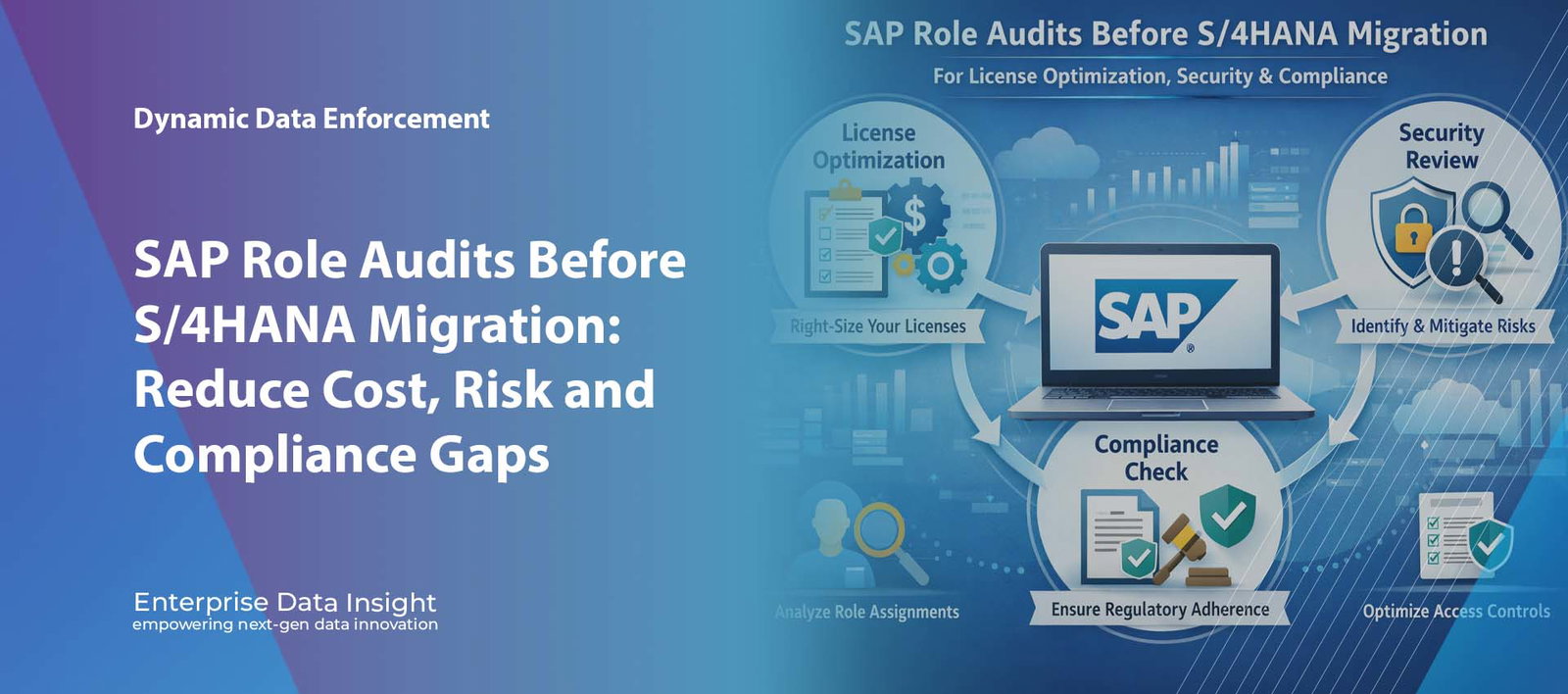
SAP GRC | SAP Security | S/4HANA Migration | Role Management Powerful SAP Role Audits Before S/4HANA Migration to Cut Cost, Strengthen Security and Improve Compliance SAP role audits before S/4HANA migration can uncover hidden licence waste, excessive access, weak Segregation of Duties control, and outdated authorisations before they are carried into the new platform. For organisations moving from ECC to S/4HANA, this workstream is not just a technical review. It is a business decision that improves cost control, protects sensitive data, and helps create a cleaner access model for the future environment. Lower spend Identify dormant users, duplicate accounts, and poor licence classification before migration. Stronger control Reduce broad access to payroll, finance, procurement, vendor, and customer records. Cleaner future state Improve role design and resolve SoD issues before S/4HANA goes live. How Enterprise Data Insight helps Enterprise Data Insight helps organisations analyse users, roles, authorisations, licence usage, and SoD exposure so the move to S/4HANA starts with better visibility and stronger governance. Role analysis Licence visibility Access simulation SoD governance Explore EDI GRC Solutions Talk to Our Team A role audit before migration helps reduce licence waste, tighten access, and improve governance before S/4HANA go live. Table of Contents Why role reviews matter before S/4HANA How an audit reduces licence waste How it strengthens security How it improves SoD compliance A practical SAP example How Enterprise Data Insight helps FAQ Conclusion Organisations preparing for S/4HANA often focus on data transformation, infrastructure, testing, and custom code. Yet many programmes leave one of the biggest risks untouched: the existing role model. Old roles, inactive accounts, duplicate identities, and broad access rights can all move into the target system unless they are reviewed early. Why SAP Role Audits Before S/4HANA Migration Matter A structured review of roles and authorisations gives businesses a clearer picture of who has access, why that access exists, and whether it still reflects real job responsibility. This matters because most SAP environments have evolved over many years, often through urgent changes, copied roles, manual workarounds, and limited clean up. Over time, organisations often accumulate: inactive and dormant users duplicate identities across SAP systems excessive authorisations roles that no longer match real responsibilities hidden SoD conflicts avoidable licence cost Reviewing access before S/4HANA helps prevent historical control issues from becoming future operational problems. How SAP Role Audits Before S/4HANA Migration Optimise Licence Spend One of the strongest business reasons for this activity is licence optimisation. Many organisations pay for more than they need because they cannot clearly see how users behave, which licence types are assigned, or whether access levels truly match real usage. A review can reveal where cost is being driven by poor classification, unused accounts, or duplicated access across different SAP environments. Combine users across systems In many landscapes, one person appears in several SAP applications with overlapping access and inconsistent licence treatment. Rationalising those identities can improve utilisation and reduce waste. Remove inactive access Some users log in rarely but still consume expensive licence categories. Identifying and removing dormant access frees capacity for real business demand. Better user classification also helps businesses avoid assigning higher cost licence categories where they are not justified by actual activity. Where savings usually come from Identify Find dormant users and redundant access still consuming cost. Classify Match users to the right licence category based on real behaviour. Consolidate Reduce duplicated identities across connected SAP systems. Reallocate Free up licence capacity without avoidable extra spend. How SAP Role Audits Before S/4HANA Migration Strengthen Security S/4HANA introduces broader ways to interact with enterprise data through Fiori, analytics, mobile usage, and connected business processes. That makes accurate access design more important than ever. A strong review helps organisations understand: who can access sensitive business data which roles expose payroll, finance, vendor, or customer records which users can change or extract critical information where broad access no longer matches business need how different personas should see different data This is especially relevant in HR, finance, procurement, master data, and business partner management where the impact of poor access design can be significant. Dynamic access questions where is the user coming from what data are they trying to access what device are they using what data are they trying to extract Data areas most exposed employee payroll data financial postings and journals vendor and supplier records customer and business partner data How SAP Role Audits Before S/4HANA Migration Improve SoD Compliance Segregation of Duties remains one of the most common control issues in SAP landscapes. A pre migration audit helps identify high risk combinations before they are moved into the future system. Common examples include: creating vendors and approving payments maintaining master data and posting transactions creating purchase orders and approving goods receipts posting journals and approving adjustments The best time to reduce SoD risk is before migration, not after go live when those conflicts are already embedded in the new environment. A Practical SAP Example Imagine an ECC system where a broad HR role has evolved over many years. General administrators, payroll specialists, and support staff all inherit similar permissions. During the review, the business discovers that some users can view salary data and deductions even though they only need employee master record access. If that role moves unchanged into S/4HANA, the same issue continues. A proper audit allows the organisation to separate responsibilities, redesign access by persona, and reduce exposure before migration. The real goal is not simply to review access. It is to build a cleaner, safer, and more efficient role model for the future SAP environment. How Enterprise Data Insight Helps Enterprise Data Insight helps organisations turn role audits into a structured and measurable migration workstream. Instead of relying on manual spreadsheets and fragmented review methods, teams gain better visibility across roles, users, authorisations, licence exposure, and SoD risk. Enterprise Data Insight supports: role and user analysis across SAP environments licence visibility and more accurate user classification access simulation for what if analysis SoD risk identification and governance