


Data Management
Data Management covers how organisations control, protect, move, and optimise SAP data across the full landscape lifecycle. This category includes practical guidance on SAP landscape refresh, selective copy, test data management, data masking and scrambling, governance and audit evidence, migration readiness, data retention, and data archiving. The goal is to reduce risk, improve delivery speed, and keep SAP environments compliant and performant across ECC and S/4HANA.
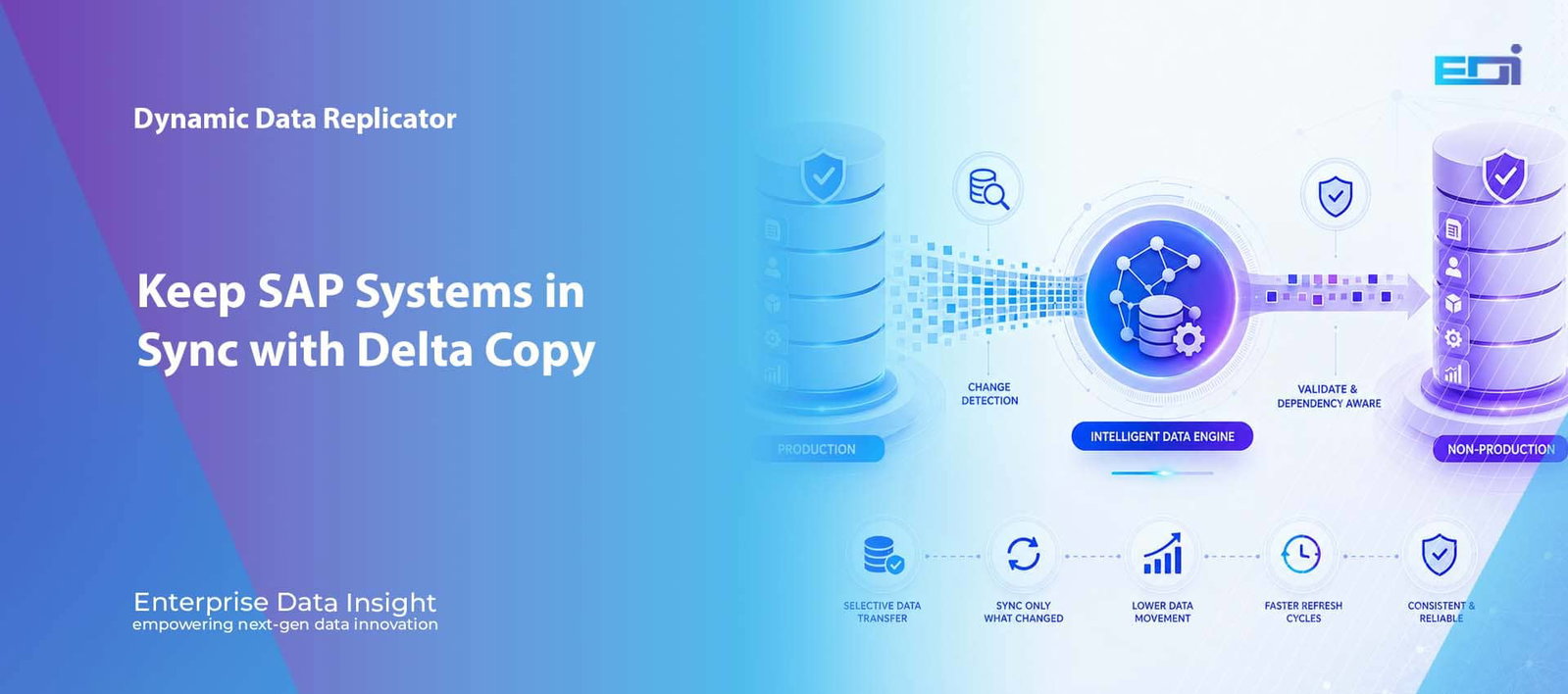
Dynamic Data Replicator Delta Copy SAP Non-Production Test Data Management Powerful SAP Delta Replication with DDR: Keep Non-Production Systems in Sync SAP delta replication is designed for a very practical problem: once a QA, Test, Development, Training or project environment already exists, why repeatedly move everything just to pick up what changed? DDR Delta Copy takes a baseline-and-delta approach, transferring new and changed data since the last successful run while bringing across the related dependencies required to keep the target usable, consistent and meaningful. Published by Enterprise Data Insight Updated 19 August 2026 Topic: SAP Delta Replication & Test Data Management Detect What Changed Start from the last successful replication point and identify the new, changed or otherwise relevant delta that must be considered for the next cycle. Preserve Business Context Expand the selected delta to the master data, documents, hierarchies, configuration and cross-module dependencies required by the target process. Prepare and Protect Apply validation, transformation, security and compliance controls before the selected data is provisioned into the target environment. Repeat on Your Cadence Run daily, weekly, monthly, quarterly, yearly or to a project schedule without rebuilding the entire target every time. See the technical model Compare full refresh vs delta AI quick answer What Is SAP Delta Replication? SAP delta replication is a controlled refresh method that keeps an existing target environment aligned by moving only the data that is new, changed or otherwise required since a defined previous replication point. With DDR Delta Copy, the delta is treated as a business-data set rather than a simple list of changed database rows: related records and dependencies can be included so that the resulting QA, Test, Development, Training or project environment remains coherent and testable. Baseline firstA reliable delta cycle starts from a known, validated target state. Dependencies matterA changed transaction is useful only when the records it relies on are also available. Repeatability mattersThe value comes from frequent, lower-impact refreshes that can be executed consistently. Key takeaways DDR Delta Copy is an intelligent extension of Dynamic Data Replicator for repeat refresh cycles. SAP delta replication reduces repeat data movement after the initial baseline has been established. The technical challenge is not only change detection; it is dependency resolution, preparation, controlled delivery and validation. Delta Copy is particularly useful for QA, regression testing, development, defect reproduction, S/4HANA programmes, integration testing, training and project systems. DDR Delta Copy — Technical OverviewEnterprise Data Insight DDR Delta Copy moves only what has changed while preserving the related business context required to keep SAP non-production environments current and usable. The problem delta solves Why Repeating a Full Refresh Can Become the Wrong Operating Model A full refresh has a clear purpose. It can create an initial target, reset an environment to a known state or rebuild a system when the entire source footprint genuinely needs to be reproduced. The problem begins when a team uses the same full-copy pattern every time it wants a relatively small amount of new production activity in QA or another non-production system. That is precisely where SAP delta replication becomes an architectural alternative rather than simply another refresh option. If yesterday’s target is already valid and only a fraction of the source has changed, repeatedly moving the full data footprint creates avoidable work. More data has to be read, transferred, processed, protected and validated. The refresh window can become larger than the actual business need, while test teams continue waiting for a current environment. SAP delta replication changes that operating model. Instead of treating every refresh as a new beginning, it treats the previous successful run as a trusted point from which the next change set can be calculated, expanded to the required dependencies and delivered as a controlled incremental refresh. The key architectural shift A full refresh asks, “How do we reproduce the target again?” SAP delta replication asks, “What has changed since the last trusted state, what does that change depend on, and what is the minimum complete dataset needed to keep the target current?” Baseline + delta Delta Copy Starts with a Known Baseline, Not with Guesswork The safest way to think about SAP delta replication is as a sequence of state transitions. The first successful replication establishes a baseline. Each later Delta Copy run then advances that target from one known state to the next by processing the changes that occurred after the previous successful run. The phrase last successful run matters. A delta boundary should not advance merely because a job started, because a partial execution can otherwise create a gap. If a run fails during preparation, transfer or validation, the next run must still know which business changes have not yet been safely represented in the target. That makes run-state management a core part of a serious SAP delta replication design. A robust implementation needs a durable record of the source scope, previous successful boundary, current execution, selected objects, transfer result and validation outcome. The exact technical markers used to identify change can vary by SAP object and implementation, but the operating principle remains the same: the delta must be anchored to a trustworthy state. BaselineInitial full replicationCreate and validate the target data state that future deltas will build upon. → Delta NNew + changed dataIdentify the business changes since the last successful run and resolve the records needed around them. → Current targetValidated incremental stateAdvance the target only after the delta has been delivered and the required checks are complete. The technical model How DDR SAP Delta Replication Works End to End The useful part of SAP delta replication is not simply identifying a changed record. The value comes from turning that change into a complete, controlled and repeatable business-data package. The supplied DDR model can be understood as six connected engineering stages: identify, relate, protect, replicate, validate and repeat. DDR Delta Copy — repeatable processing chainBusiness-aware incremental refresh 1IdentifyDetect new and changed data since the previous successful run. 2RelateResolve the master, transactional and cross-object dependencies the delta requires. 3ProtectApply selected
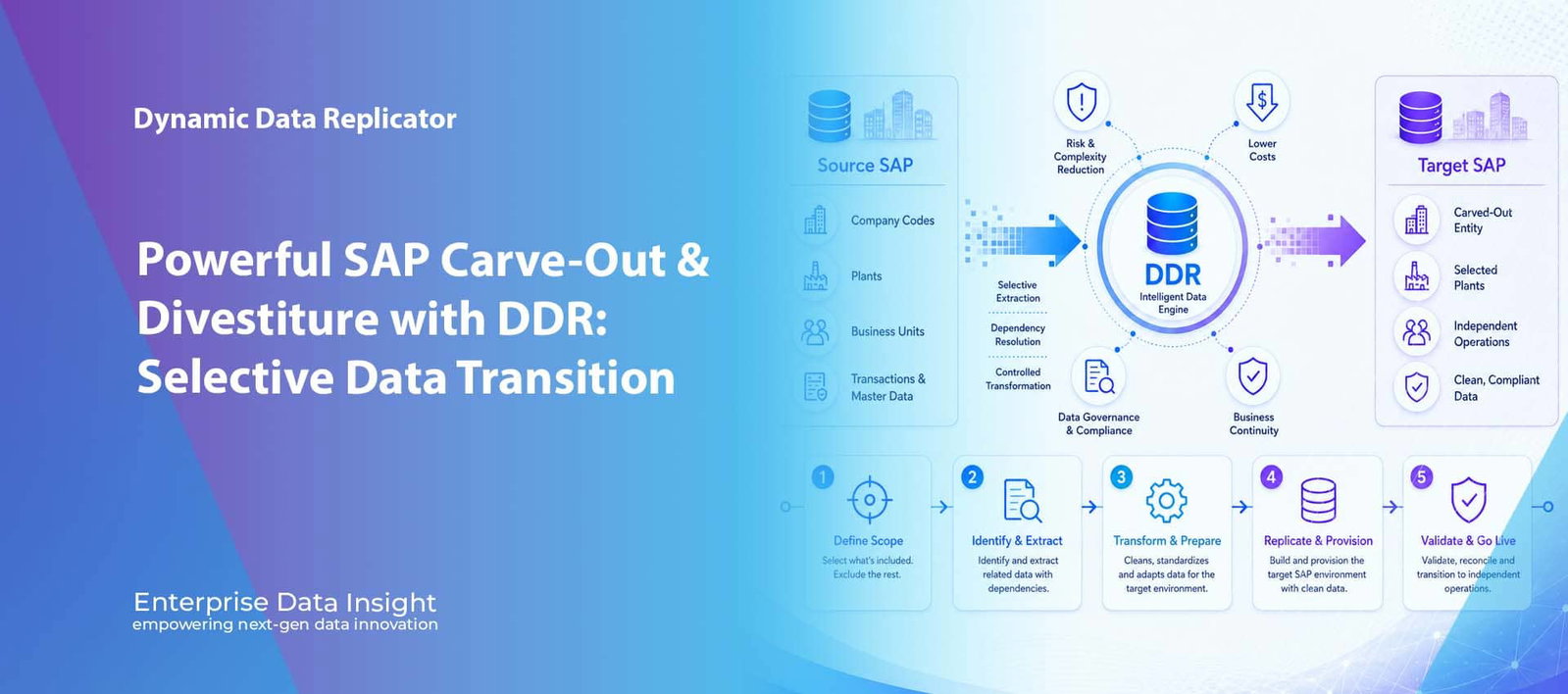
Dynamic Data Replicator SAP Carve-Out & Divestiture Selective Data Transition Powerful SAP Carve-Out & Divestiture with DDR: Selective Data Transition A powerful SAP carve-out strategy starts with the data-separation model, not the system copy. SAP carve-outs and divestitures are fundamentally data-separation programmes. The commercial transaction may involve the sale of a business unit, the separation of a legal entity, a joint-venture exit or the creation of a standalone operation, but the technical challenge is always broader than moving a few company codes. The target organisation needs a coherent, compliant and operationally usable SAP dataset containing the right master data, transactions, history and dependencies — without inheriting everything that belongs to the seller. Published by Enterprise Data Insight Updated 18 August 2026 Topic: SAP Carve-Out & Selective Data Transition Define the Business Perimeter Start with the legal and operational scope: company codes, plants, organisational units, customers, materials, objects and required history. Resolve SAP Dependencies Follow the related master, transactional and document-flow relationships needed to keep the selected business data usable. Prepare the Target Model Validate, cleanse and transform selected information so it fits the future operating model rather than simply reproducing the seller’s structure. Validate Before Go-Live Reconcile records, relationships, balances and business processes so the target is demonstrably complete before transition. See the five-stage model Explore Dynamic Data Replicator Quick answer What Does DDR Do in an SAP Carve-Out? Dynamic Data Replicator (DDR) supports an SAP carve-out or divestiture by identifying the approved business scope, resolving the SAP data relationships needed by that scope, preparing the selected dataset and replicating it into a controlled target environment. The goal of the SAP carve-out is not simply to create a smaller copy of production. The goal is to create a business-ready target containing the data the separated organisation is entitled to receive and needs to operate. ScopeCompany codes, plants, legal entities, organisational units, customers, materials, transactions and time periods. Engineering challengeCross-module relationships, shared master data, custom objects, history, document chains and transformation requirements. Target outcomeA leaner, validated and governed SAP environment designed for the future business rather than the source organisation. DDR for Carve-Out, Divestiture & Selective SAP Data SCOPE • EXTRACT • TRANSFORM • REPLICATE • VALIDATE DDR supports a controlled five-stage carve-out lifecycle: define the business perimeter, identify and extract the related SAP data, transform and prepare it for the future operating model, replicate the approved dataset and validate the target before go-live. The engineering problem Why SAP Carve-Outs Become Complex So Quickly At first sight, an SAP carve-out can look like a straightforward organisational-selection exercise. A programme might identify a company code, several plants and a date range, then assume that those values define everything that must move. In a mature SAP landscape, however, the business data attached to that scope is distributed across many modules, objects and technical relationships, which is why an SAP carve-out must be engineered around the business process rather than a single organisational filter. A selected company code can be linked to customers, vendors, materials, cost centres, profit centres, assets, contracts, purchase orders, sales orders, deliveries, invoices, accounting documents and years of related history. Those objects can then reference shared master data, cross-company transactions, custom tables, interfaces, attachments and downstream documents. A technically correct filter on one organisational field can therefore produce a target that is incomplete from a business-process perspective. The central SAP carve-out challenge is consequently not just which tables contain the data. It is determining which business records belong to the separated organisation, which dependencies are required for those records to remain usable and which information must remain with the seller. DDR is designed around this relationship-driven view so that an SAP carve-out becomes a controlled selective data transition rather than a broad database-copy exercise. Stage 1 — Define scope Start With the Business Perimeter, Not the Database A successful SAP carve-out begins by translating the transaction perimeter into a data perimeter. The programme needs to establish which legal entities, business units, organisational structures and historical periods are in scope before any technical extraction rules are finalised. Typical SAP carve-out criteria include company codes, plants, sales organisations, purchasing organisations, customers, vendors, materials, business objects and defined time periods. Those values are important, but they are only the starting point. The business perimeter describes what the buyer or standalone organisation is expected to receive; it does not automatically identify every dependent record needed to operate that data. DDR uses the defined scope as the entry point for discovering the wider data footprint associated with the selected business. Legal scopeCompany Code 1200 The transaction perimeter identifies the legal entity being separated. Operational scopePlants 1201 and 1202 Plant-level operations may bring related materials, inventory, purchasing and production dependencies. Commercial scopeSales Organisation UK20 Commercial transactions may require customer, pricing, delivery, billing and accounting context. Historical scopeFive years of selected history Retention requirements can vary by object, legal obligation and future operational need. The practical rule is simple: business scope should drive technical scope, but technical scope must expand far enough to preserve the approved business relationships. This prevents both under-selection, which produces broken processes, and over-selection, which moves information the target does not need or is not entitled to receive. Stage 2 — Identify & extract Dependency Resolution Is the Core of Selective SAP Data Separation SAP transactions rarely exist as isolated records. A sales order, for example, can depend on customer and material master data, organisational assignments, pricing conditions and the subsequent document chain. The same transaction may later connect to delivery, goods movement, billing and financial posting. Moving only the primary document can therefore create a target that contains the record but cannot reproduce the process. DDR approaches selective extraction as a dependency-resolution problem. The selected object becomes the anchor and the data model follows the related records that are required to preserve business meaning in the target. The exact dependency graph varies by process and landscape, but the engineering objective remains the same: preserve the relationships required for the selected business
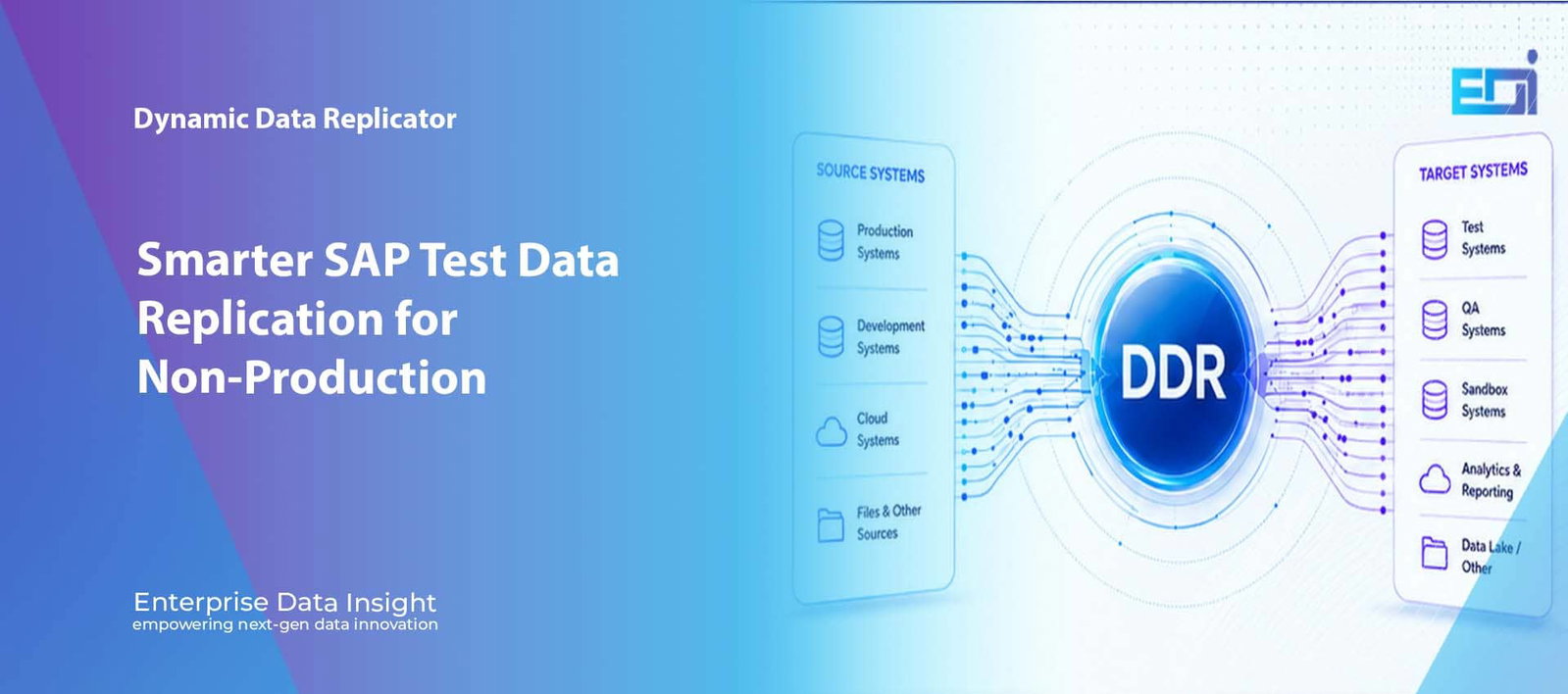
Dynamic Data Replicator SAP Test Data Management Selective Data Replication What Is Dynamic Data Replicator (DDR)? SAP Test Data Management Explained Dynamic Data Replicator (DDR) is Enterprise Data Insight's selective SAP test data management platform for delivering relevant, secure and governed data into non-production environments. Instead of making every DEV, QA, training, sandbox or S/4HANA requirement depend on another full production copy, DDR is designed to move the data required for the scenario together with the related SAP business context needed to use it. Published by Enterprise Data InsightUpdated 18 August 2026Topic: SAP Test Data Management Move the Right Data Replicate selected SAP data for the scenario instead of transferring an entire production-sized dataset every time. Preserve Business Context Include the related records, documents and dependencies required to make the selected data usable in the target. Protect Sensitive Information Apply approved scrambling and controlled access so production-like data can be used more safely outside production. Automate and Govern Turn recurring data movement into a repeatable service with scheduling, validation, monitoring and operational control. See how DDR works Explore Dynamic Data Replicator Quick answer What Is Dynamic Data Replicator (DDR) in SAP? Dynamic Data Replicator (DDR) is a selective SAP data replication and test data management platform from Enterprise Data Insight. It helps organisations deliver only the SAP data required for a non-production use case, preserve the related business dependencies, protect sensitive information and repeat the delivery through a controlled, validated process. Primary purposeDeliver relevant SAP data to non-production without defaulting every request to a complete system copy. Typical targetsDEV, QA, test, training, sandbox, projects, analytics and S/4HANA programme environments. Core controlsSelective scope, dependency awareness, scrambling, scheduling, monitoring, validation and governance. Key takeaways DDR is designed to move the data required for a scenario rather than automatically copying an entire production-sized dataset. Selected SAP data must remain usable, so related records and business context form part of the delivery model. Security is built into the approach through data minimisation, approved scrambling and controlled access. Full system copies still have a role when broad production-scale volume or complete landscape state is genuinely required. What Is DDR? — Selective SAP Data Replication from Source to Target PRODUCTION • DEV • QA • SANDBOX • ANALYTICS Dynamic Data Replicator sits between source and target systems and is designed to selectively move the SAP data required for a business scenario, together with the related context needed to use it. The objective is not simply a smaller copy; it is a controlled, relevant and repeatable non-production data service. DDR explained What Is Dynamic Data Replicator? Dynamic Data Replicator, or DDR, is Enterprise Data Insight’s platform for selective SAP data replication and test data management. Its purpose is straightforward: give non-production teams the business data they need without automatically copying everything that exists in production. Traditional SAP refresh models often start with the system. A team asks for a DEV, QA, training or project environment, and the response is to create or refresh that environment from a broad production copy. DDR starts from a different question: what data is required for this specific business or technical purpose? That difference matters. A developer reproducing a pricing defect may need a particular sales document and its related customer, material, plant, pricing and document-flow context. A training team may need a realistic but protected dataset for selected business processes. A project team may need a controlled slice of data for one company code, plant, date range or programme phase. DDR is designed to support that selective approach. Entity note: Dynamic Data Replicator is developed by Enterprise Data Insight as part of its SAP data management and non-production data capabilities. DDR in one sentence DDR selectively replicates the right SAP data — with the related context required to use it. Search answer: What problem does DDR solve? DDR addresses the gap between a small non-production data requirement and a large system-refresh operation. It gives SAP teams a selective option when a complete production copy would move more data, expose more information or require more operational effort than the use case needs. For related capabilities, explore Dynamic Data Replicator for SAP, SAP test data management with DDR and Enterprise Data Insight's broader approach to controlled non-production data delivery. The non-production challenge Why Copying Everything Is Not Always the Best Answer Full SAP system copies remain valuable when a test or project genuinely requires broad production-scale data. The issue appears when the same full-copy approach is used for every requirement, regardless of how much of the copied information will actually be used. That can create a mismatch between the size of the technical operation and the size of the business need. A small defect-reproduction scenario may wait for a large refresh. A training environment may inherit data that has no relevance to its exercises. A sandbox may contain far more sensitive production information than users require. A QA team may receive current data only when a major refresh window becomes available. DDR is designed to introduce another option: retain full refreshes where they are justified, but use selective replication when a narrower and more relevant dataset can meet the requirement. This makes the data-delivery model more proportional to the actual use case. How DDR works From Source Systems Through DDR to Fit-for-Purpose Targets DDR operates as a controlled data-movement layer between source and target environments. Source data can originate from production systems, development systems, cloud environments, files or other approved sources. Targets can include test systems, QA systems, sandboxes, analytics and reporting environments, data lakes or other approved destinations. SourceSAP + OtherProduction, development, cloud, files and approved source environments. → DDRSelect + ProtectDefine scope, resolve related context, apply protection, execute and validate. → TargetFit for PurposeDEV, QA, test, training, sandbox, analytics, projects and transformation landscapes. A practical DDR data-delivery flowControlled execution 01Define NeedIdentify the business scenario, object, organisation, period or project requirement. 02Select ScopeChoose the data that is actually required rather than defaulting to the full source. 03Resolve ContextInclude related records and
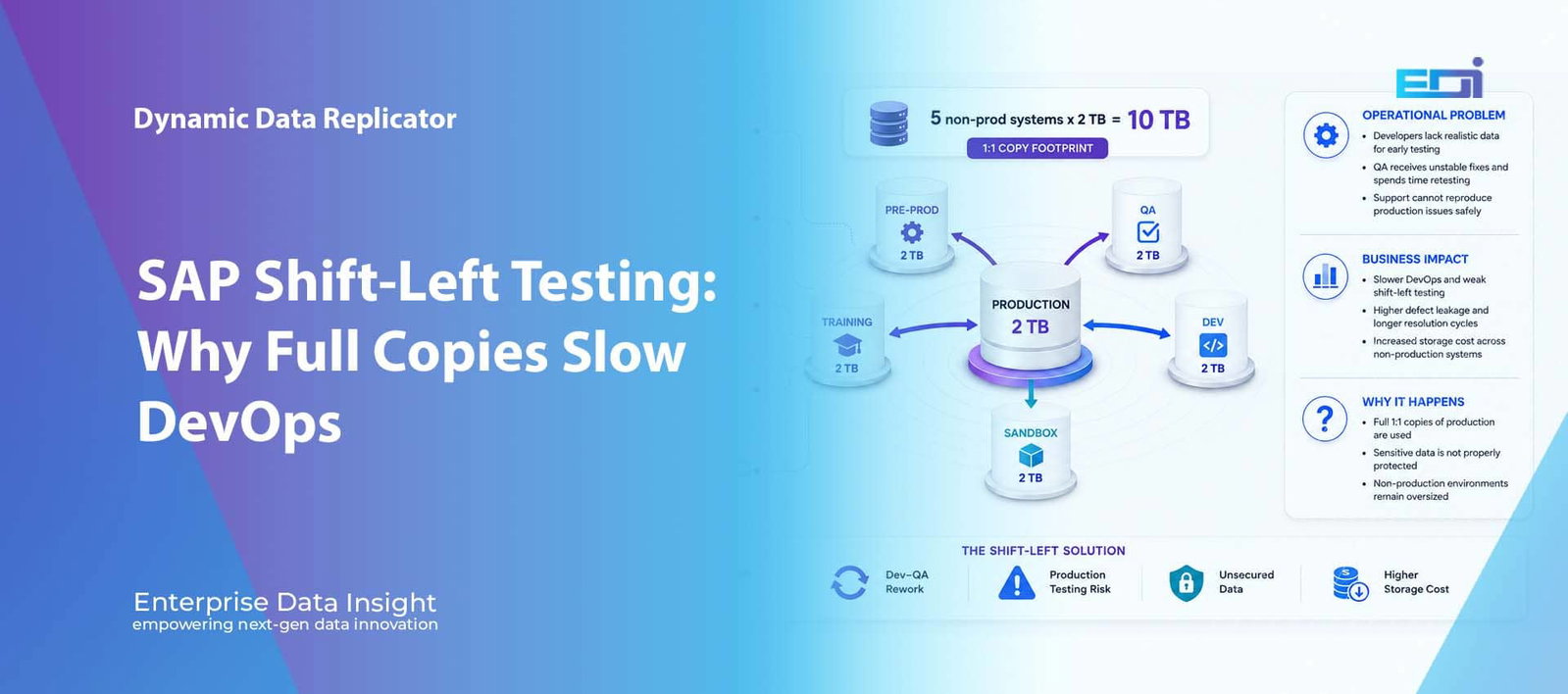
Dynamic Data ReplicatorSAP Shift-Left TestingDevOps & Test Data Management SAP Shift-Left Testing: Why Full Production Copies Can Slow DevOps SAP Shift-Left Testing depends on development and QA teams receiving realistic, secure and repeatable test data early enough to find defects before they move downstream. When every non-production environment depends on a large one-to-one production copy, the data model can work against DevOps: refreshes take longer, environments remain oversized, sensitive production data spreads into more systems, and developers are often forced to test against stale or manually created records. Development Starts Without the Right Data Developers can build and unit-test code, but realistic business scenarios may not be available until a later refresh or QA cycle. Data-dependent defects therefore move downstream. QA Becomes the First Real Test When meaningful data only appears in QA, initial deliveries generate rework and longer Dev–QA feedback loops instead of confirming a change that has already been exercised realistically. Support Cannot Reproduce Issues Safely Without relevant production-like context outside production, support can struggle to recreate complex issues and may spend time manually rebuilding scenarios. The Operating-Model Question The challenge is not simply how fast another full copy can be created. It is whether DEV, QA, pre-production, training and sandbox all need production-sized data for every use case. See the technical patternExplore Dynamic Data Replicator SAP DevOps & Shift-Left Testing — Why 1:1 Production Copies Create FrictionDEV • QA • PRE-PROD • TRAINING • SANDBOX Illustrative scenario: a 2 TB production system copied one-to-one into five non-production environments creates a 10 TB non-production data footprint before backups, snapshots, replication or additional project systems are considered. The business issue is not the arithmetic itself; it is the dependency between realistic testing and heavyweight environment refreshes. Why shift-left matters SAP Shift-Left Testing Requires Realistic Data Before QA Shift-left testing is often described as moving testing earlier in the software-development lifecycle. In practice, that means much more than running unit tests sooner. The development team needs feedback early enough to correct defects while the change is still small, the technical context is fresh and the cost of rework is relatively low. SAP’s continuous integration guidance follows the same principle: code changes are integrated frequently and verified through builds and automated testing before integration so that errors can be detected as quickly as possible. NIST’s DevSecOps guidance similarly describes shift-left as integrating security earlier in the development lifecycle and using automation so that checks are performed consistently throughout the pipeline. The difficulty in SAP is that code quality and business-process quality are not the same thing. A developer can run static checks and unit tests without a production-like dataset, but many enterprise defects only appear when the change meets realistic organisational structures, master data, document histories, pricing, configuration, authorisations, interfaces and downstream dependencies. If that information only becomes available in QA, the organisation has shifted the code left without shifting the business test data left. Authoritative reference — continuous integration and shift-left See SAP Continuous Integration and Delivery and NIST DevSecOps Practices. The 1:1 copy model Why Production-Sized Non-Production Systems Work Against a Faster Test Cycle A full SAP system copy can be entirely appropriate when the target genuinely needs the breadth and scale of production. The problem appears when one-to-one copying becomes the default response to every test-data requirement. DEV, QA, pre-production, training and sandbox environments can then inherit production-scale data volumes even when each environment serves a very different purpose. The supplied slide illustrates a simple scenario in which production is 2 TB and five non-production systems are each maintained as 2 TB copies. That creates a 10 TB non-production footprint. In a real landscape the total infrastructure effect can be larger once backups, snapshots, high-availability requirements, database overhead, temporary migration systems and project landscapes are included. The larger operational problem is refresh dependency. If a developer needs only a current customer, material, pricing condition and recent sales-document chain, waiting for a multi-terabyte refresh is disproportionate to the requirement. Teams compensate by using old data, manually building transactions or delaying meaningful testing until a later environment becomes available. Production example2 TBIllustrative production footprint in the supplied slide. × Non-production systems5DEV, QA, Pre-Prod, Training and Sandbox. = Copy footprint10 TBBefore backup, snapshot and extra project capacity. Development impact Developers Can Shift Code Left While Business Defects Still Move Right Modern SAP development pipelines can automate code-quality checks, builds, deployments and unit tests. Those controls provide rapid technical feedback, but they do not automatically prove that a change works against the business conditions it will encounter after release. Consider a developer changing logic used during sales-order processing. Unit tests may pass because the code behaves correctly for controlled cases. The defect may only appear when a particular combination of customer hierarchy, material status, pricing condition, tax treatment, credit exposure and document history is present. If DEV does not contain that combination, the change may reach QA before anyone sees the problem. This is why a shift-left programme needs a test-data strategy as well as toolchain automation. Earlier testing becomes materially more valuable when the environment contains enough relevant business context to exercise the risks associated with the change. QA feedback loop When QA Receives the First Realistic Dataset, QA Becomes the First Integration Test Quality assurance should validate a change that has already survived meaningful developer testing. In many SAP landscapes, however, QA becomes the first environment with sufficiently realistic data to expose cross-object and cross-process problems. The result is a familiar loop: delivery fails, QA documents the defect, development recreates it, a correction is transported and QA repeats the same scenario. That back-and-forth lengthens lead time because every defect crosses team and environment boundaries before it can be resolved. The organisation may have automated its transport pipeline while still maintaining a slow data-feedback loop. Shift-left test data changes the purpose of QA. Developers can validate high-risk scenarios earlier using controlled production-like data, while QA can concentrate more of its time on integration coverage, regression, business acceptance and release confidence
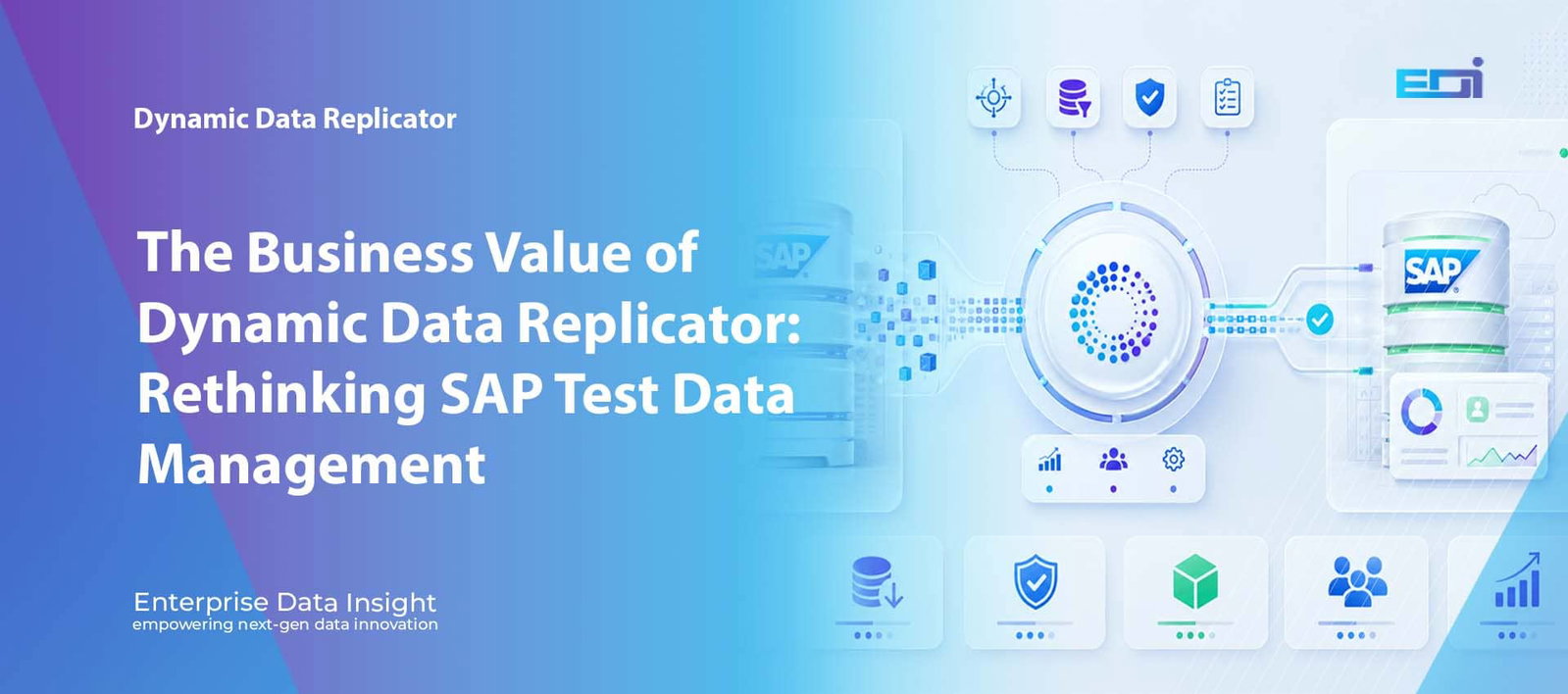
Dynamic Data Replicator SAP Test Data Management Selective Replication The Business Value of Dynamic Data Replicator: Rethinking SAP Test Data Management SAP non-production data management is becoming increasingly difficult to justify using traditional full-copy methods. Dynamic Data Replicator changes the operating model by allowing organisations to determine what business data is actually required, replicate that data selectively and reduce the infrastructure, administration and delivery delays associated with repeatedly moving production-scale environments. Refresh Pressure Development, testing and support teams need current SAP data more frequently, while traditional refresh processes can still require significant preparation, execution, post-copy activity and specialist Basis involvement. Infrastructure Economics Large non-production environments can consume substantial storage and operational capacity even when only a limited business scope is required for the actual test or project activity. Data Quality & Governance The value of a test environment depends on relevant, current and usable data. Selective delivery can also reduce unnecessary exposure of sensitive production information. The CIO Question The strategic question is no longer simply how quickly another SAP system can be copied. It is whether the entire production-scale dataset needs to be moved at all. Selective dataAutomationS/4HANAGovernance Explore Dynamic Data Replicator Discuss a DDR use case Dynamic Data Replicator — SAP Data Management Value Model Challenges • Value • Executive Outcomes The DDR value model brings together the operational problems created by conventional SAP refresh strategies and the potential business impact of a more selective, automated and governed approach. Why this matters Why SAP Test Data Management Needs a Different Operating Model For many SAP organisations, the challenge is no longer whether system copies can be performed. The more important question is whether moving a large proportion of production data every time a development, testing, support or transformation team needs current information remains the right operating model. Production databases continue to grow, S/4HANA programmes require repeated test and migration cycles, infrastructure costs are under closer scrutiny, and project teams increasingly expect useful data to be available when they need it. A traditional refresh can therefore create a disproportionate amount of work: data is moved, specialist SAP resources are allocated, storage is consumed, post-copy processing is completed and the project waits for the environment to become usable. Dynamic Data Replicator (DDR) approaches the problem from a different starting point. Instead of treating every requirement as another full-system copy, DDR enables organisations to define the business scope first and selectively replicate the information required for that purpose. Traditional refresh risk Why the Traditional SAP Refresh Model Is Becoming a Business Constraint SAP system refreshes have traditionally been treated as infrastructure or Basis activities, but their impact extends across project delivery. A refresh may require system preparation, database movement, post-copy configuration, validation, workflow coordination and environment-specific processing before the system can be released back to users. Where these activities remain highly manual, the operational effort can be significant. In some environments, an estimated 40–70% of refresh-related work can involve manual activity. The exact proportion will differ between organisations, but the underlying problem is consistent: specialist teams repeatedly spend time on technical tasks that could potentially be standardised and automated. The consequence is wider than additional administration. Development teams wait for current data, testing can be delayed, production defects take longer to reproduce, user acceptance testing may be compressed and migration rehearsals become harder to schedule. A technical refresh process can therefore become a constraint on the organisation’s ability to deliver SAP change at the pace the business expects. Infrastructure economics Large Non-Production Systems Can Carry a Cost That Adds Little Testing Value As production systems grow, conventional copying methods can result in equally large development, quality assurance, training and support environments. Organisations may therefore find themselves storing, backing up and maintaining significant volumes of historical production information that have limited relevance to the activity being performed in the target system. The infrastructure implications can extend across database capacity, backup windows, storage tiers, cloud consumption and operational support. The organisation is effectively paying to move and preserve information because it exists in production, rather than because the non-production requirement genuinely needs it. Selective replication changes that equation. Instead of optimising how quickly an oversized dataset can be copied, the organisation can reduce the amount that needs to move in the first place. In suitable DDR scenarios, the value model identifies the potential for up to 80% lower infrastructure and storage demand and up to 95% smaller non-production environments. 95%Potentially faster SAP system refreshes. 80%Potential reduction in infrastructure and storage. 95%Potentially smaller non-production environments. 70%Potential reduction in repetitive Basis administration. Test data quality More Data Does Not Automatically Produce Better SAP Testing A test environment containing more production information is not automatically a better test environment. A developer investigating a problem with a sales process does not necessarily need years of unrelated transactions. What matters is whether the relevant customer, material, pricing, document flow and dependent records are available in a form that accurately supports the scenario being tested. The same principle applies to transformation programmes. A migration team may need a specific company code, plant, organisational structure or period of transactional activity. If non-production systems are refreshed infrequently, the data can become outdated, forcing teams to create transactions manually, repair dependencies or search for usable examples. That preparation effort is rarely included when organisations calculate the cost of test-data management, but it directly affects delivery productivity. In suitable use cases, the DDR value model identifies the potential for up to 90% faster test-data delivery, helping teams obtain more current and relevant information closer to the point at which they need it. Selective replication Start With the Business Requirement, Not the System Copy Dynamic Data Replicator changes the starting point of SAP data delivery. Rather than assuming that an entire SAP system must be refreshed, the organisation begins by identifying the actual requirement. That requirement might relate to a business object, selected tables, an organisational scope, a client, a specific date range, a defined transaction set or changes that have occurred since
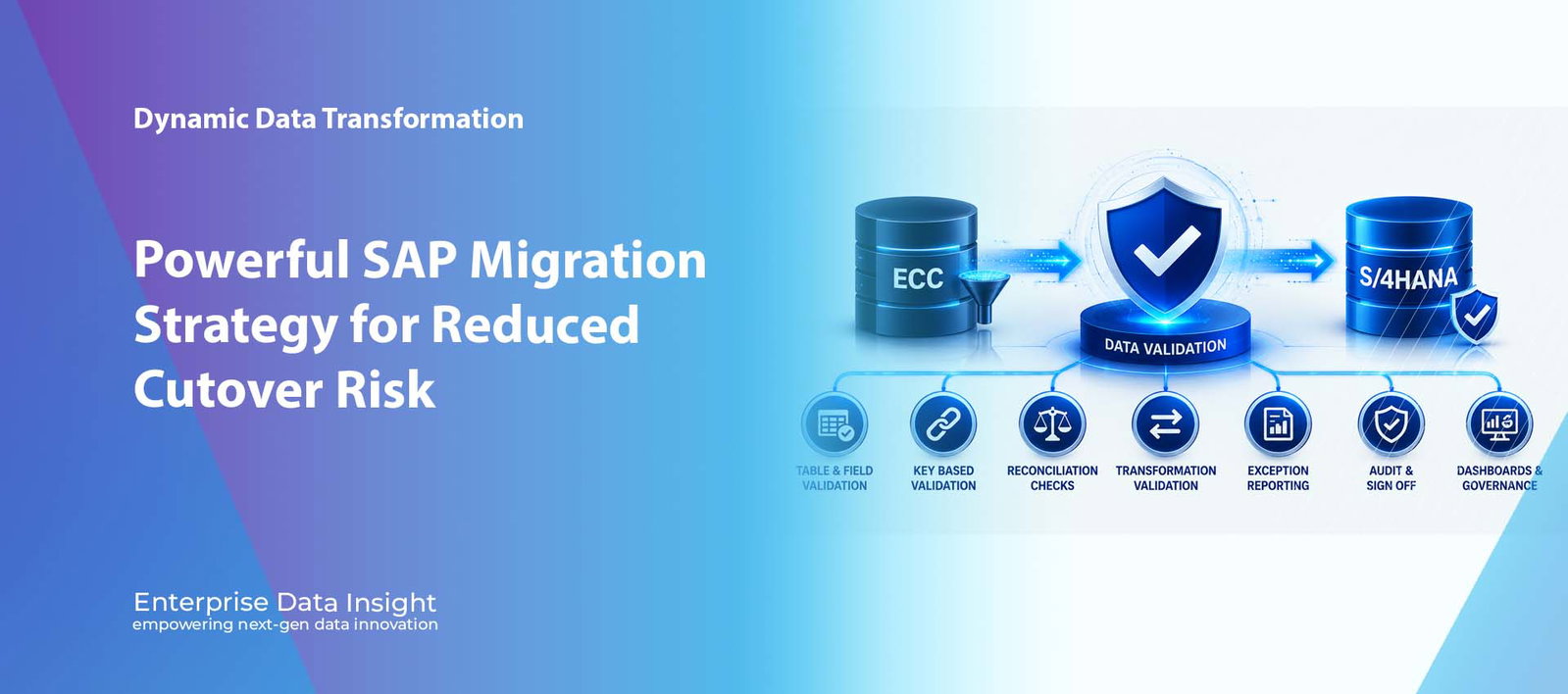
Dynamic Data Replicator | ECC to S/4HANA | Continuous Synchronisation ECC and S/4HANA Synchronisation: Powerful SAP Migration Strategy for Reduced Cutover Risk ECC and S/4HANA Synchronisation is the missing strategy in many SAP S/4HANA migration programmes. The initial migration load creates the target environment, but the live ECC system continues to change every day. Dynamic Data Replicator helps organisations continuously replicate, validate, and reconcile data between ECC and SAP S/4HANA so testing remains current, cutover deltas stay smaller, downtime is reduced, and CIOs gain evidence based confidence in go live readiness. Current Testing Keep S/4HANA test and migration environments aligned with live ECC changes instead of testing against stale snapshots. Reduced Cutover Reduce the final migration delta by synchronising changes throughout the programme rather than leaving everything to the final weekend. Lower Risk Improve validation, reconciliation, and go live confidence by keeping source and target systems closer together. The CIO question The strategic question is no longer simply how to migrate ECC to S/4HANA. It is how to keep both systems aligned while the business continues to operate. Delta synchronisation Object replication Cutover reduction Migration assurance Explore DDR Object Replicator Discuss S/4HANA Synchronisation Dynamic Data Replicator Migration Synchronisation ECC and S/4HANA Synchronisation Keep Migration Testing Current. Reduce Cutover Risk. LIVE SOURCE SAP ECC New customers Purchase orders Invoices and goods movement Inventory and finance changes DDR SYNCHRONISATION LAYER Detect. Replicate. Validate. Reconcile. Continuously align changed records, business objects, time slices, company codes, plants, and transaction scope. Delta • Object • Schedule • Filter • Validate • Audit TARGET SAP S/4HANA Current test data Smaller cutover delta Improved reconciliation Go live confidence Migration creates the target environment. Synchronisation keeps it relevant. DDR helps SAP teams reduce cutover pressure by keeping ECC and S/4HANA aligned throughout the migration lifecycle. ECC and S/4HANA Synchronisation helps migration teams keep source and target environments aligned throughout testing, rehearsal, cutover, and go live preparation. ECC and S/4HANA Synchronisation is one of the most important capabilities missing from many SAP S/4HANA migration programmes. Most projects focus heavily on the initial load from SAP ECC into the target SAP S/4HANA environment. The target is built, data is loaded, business users begin testing, reports are reconciled, interfaces are connected, and cutover planning begins. Then a practical problem appears. ECC continues to operate. New customers are created. Vendors are changed. Purchase orders are raised. Sales orders are processed. Invoices are posted. Goods movements occur. Financial documents are created. Production planning continues. Inventory positions change constantly. The moment the initial migration load completes, the target SAP S/4HANA environment starts falling behind. Why ECC and S/4HANA Synchronisation Matters The issue is not that SAP migration teams cannot move data. Most programmes already know how to extract, transform, and load data into SAP S/4HANA. The real challenge is maintaining alignment while the business continues to trade, manufacture, procure, sell, ship, invoice, and close financial periods in ECC. Without continuous synchronisation, business users test against outdated data, reconciliation becomes harder, cutover deltas grow, and project teams face a larger volume of unresolved change during the final migration window. This creates direct CIO level risk because the programme becomes more dependent on a high pressure cutover weekend. Migration moves the starting point. Synchronisation maintains alignment. That distinction can determine whether SAP S/4HANA go live is controlled or chaotic. Why Traditional Migration Approaches Create Risk A traditional migration approach usually follows a familiar pattern. An initial load is performed. Users test the target. A final delta is moved during cutover. The organisation switches to SAP S/4HANA. On paper, this model appears straightforward. In practice, the longer testing continues, the larger and riskier the delta becomes. In large SAP environments, weeks or months of activity can accumulate between the initial load and go live. That activity may include: millions of new or changed financial transactions new and updated customers, vendors, and Business Partners new purchase orders, sales orders, deliveries, and invoices inventory changes across multiple plants and warehouses new production orders and material movements master data changes across materials, assets, cost centres, and profit centres configuration or organisational changes required by the programme By the time cutover arrives, project teams are expected to process, validate, reconcile, and sign off a large volume of change in a compressed window. Any defect discovered during that period can delay go live or force manual remediation. The Hidden Cost of Out-of-Sync Migration Landscapes Out-of-sync landscapes create hidden cost long before the go live weekend. Business users may spend weeks testing processes against data that no longer represents the live organisation. Developers may investigate defects that are caused by stale data rather than system design. Finance teams may struggle to reconcile reports because the source and target are drifting further apart every day. This creates wasted effort, reduced confidence, more rework, and increased reliance on manual spreadsheets. The programme appears busy, but the quality of testing evidence becomes weaker because the target system is no longer close enough to the live ECC position. Why Final Delta Migration Alone Is Not Enough Delta migration is important, but relying on one final delta load is not enough for complex SAP landscapes. A single cutover weekend can become responsible for changed master data, new transactions, updated documents, deleted records, open item reconciliation, inventory changes, and final business sign off. The problem is not simply the volume of data. The issue is the business pressure created when data movement, validation, reconciliation, defect investigation, and executive go live decision making all happen at the same time. Continuous ECC and S/4HANA Synchronisation reduces this pressure by keeping the delta smaller throughout the programme. Instead of treating alignment as a final event, synchronisation becomes a controlled operating model during migration. What Must Be Synchronised Between ECC and S/4HANA? A successful SAP S/4HANA migration requires more than table level copying. The source and target systems must remain aligned across the data objects that matter to business process execution, testing, reconciliation, and cutover readiness. Master and organisational data customer master
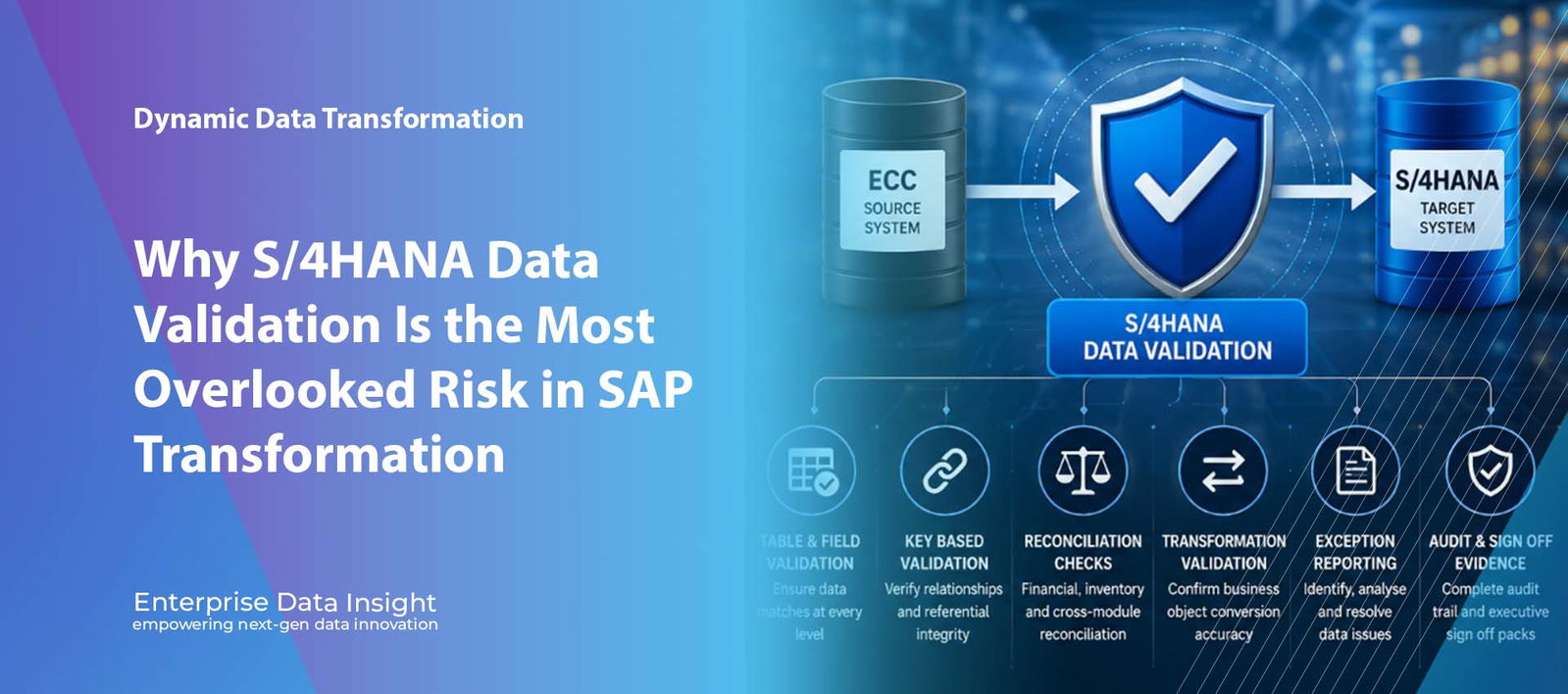
S/4HANA Data Validation | Migration ROI | SAP Reconciliation S/4HANA Data Validation: Powerful ROI Protection for SAP Migration S/4HANA Data Validation is the control that proves whether an SAP migration has delivered a trusted business outcome, not just a successful data load. Enterprise Data Insight helps organisations validate ECC to S/4HANA migration results across finance, procurement, inventory, Business Partner, master data, transactional data, custom tables, reconciliation rules, and cross module dependencies so executives can sign off the migration with evidence instead of assumptions. Business Trust Prove that migrated data is complete, accurate, reconciled, transformed correctly, and usable before the business depends on it. ROI Protection Reduce expensive post go live remediation by detecting migration defects during mock loads, rehearsals, and cutover. Audit Evidence Maintain validation results, exceptions, reconciliation evidence, ownership, and sign off history for governance review. The executive question The real question is no longer whether ECC data was loaded into S/4HANA. It is whether the organisation can trust the S/4HANA data enough to run finance, supply chain, procurement, analytics, and reporting. ECC to S/4HANA Financial reconciliation Business integrity Migration assurance Explore Dynamic Data Transformation Discuss Migration Validation Enterprise Data Insight Migration Assurance S/4HANA Data Validation Prove The Migration Outcome, Not Just The Data Load SOURCE SYSTEM SAP ECC Finance balances Customers and vendors Inventory and materials Custom table data VALIDATION CONTROL LAYER Compare. Reconcile. Prove. Sign Off. Validate completeness, accuracy, transformation, relationships, balances, open items, and exceptions. Record Counts • Field Checks • Hashing • Reconciliation TARGET SYSTEM SAP S/4HANA Universal Journal Business Partner New reporting models Transformed objects Migration moves data. Validation protects the business. EDI helps organisations prove that S/4HANA data is complete, accurate, reconciled, auditable, and trusted. S/4HANA Data Validation proves that migrated SAP data is complete, accurate, reconciled, transformed correctly, and trusted by the business. S/4HANA Data Validation has quietly become one of the most critical success factors in SAP transformation programmes. Yet despite organisations investing millions in SAP S/4HANA migration initiatives, validation often receives only a fraction of the attention given to migration strategy, data extraction, infrastructure planning, testing, and cutover execution. The assumption is simple. If the migration completed successfully, the data must be correct. Unfortunately, experience shows otherwise. Some of the most expensive post go live issues are not caused by failed migrations. They are caused by migrations that appeared successful but introduced undetected data quality, reconciliation, transformation, and integrity issues into the target SAP S/4HANA environment. Why S/4HANA Data Validation Is the Missing Control Most SAP migration programmes measure success using technical metrics. How many objects were migrated. How many records were loaded. Whether the migration completed within the planned cutover window. Whether interfaces restarted successfully. Whether users could log into the new system. These metrics matter, but they do not answer the question executive leadership ultimately cares about: can the business trust the information inside SAP S/4HANA? A migration programme can move hundreds of millions of records from SAP ECC into SAP S/4HANA. The migration logs may show completion. Record counts may match. Yet financial balances can still fail to reconcile, inventory valuations can still be incorrect, Business Partner relationships can still be incomplete, and management reports can still produce different results from the numbers the organisation relied upon for years. A migration that completed and a migration that can be trusted are not the same thing. S/4HANA Data Validation is the control that proves the difference. The Cost of Getting Data Validation Wrong Data defects are most expensive when they are discovered after go live. At that stage, business users are already operating in the new system, project teams may have moved on, original migration evidence can be difficult to reconstruct, and urgent remediation activity competes with normal production support. The financial impact is not limited to technical rework. Poor migration validation can create delayed month end close, inaccurate management reporting, inventory write offs, procurement disruption, payment delays, manual reconciliation effort, loss of user confidence, and additional consulting cost. This is where the ROI case for validation becomes clear. S/4HANA Data Validation protects the migration investment by finding defects when they are cheaper to fix, easier to explain, and less disruptive to the business. Why SAP S/4HANA Introduces New Validation Challenges S/4HANA Data Validation becomes significantly more important because organisations are not simply transferring data between databases. They are moving into a fundamentally different business architecture. Traditional customer and vendor records are transformed into Business Partner. Financial data is consolidated into ACDOCA and the Universal Journal. Reporting structures and analytical models change. Business relationships and object dependencies evolve. Custom developments, custom tables, and extensions must be redesigned or adapted. Historical data, open items, and transformed records must remain usable and reconcilable. The challenge is not only technical. It is logical, relational, financial, and operational. A technically successful data load can still produce an unreliable business outcome if the transformed information is not validated properly. Why Record Counts Alone Are Dangerous One of the most common mistakes in SAP migration projects is treating record counts as proof of success. If ten million records exist in SAP ECC and ten million records exist in SAP S/4HANA, the migration is often considered validated. This creates a dangerous false sense of confidence. Ten million incorrect records are still ten million records. A Chief Financial Officer does not care whether table counts match. They care whether financial statements remain accurate. A Supply Chain Director does not care whether a migration log completed. They care whether inventory positions can be trusted. A Procurement Director does not care whether a conversion job finished on time. They care whether supplier information remains complete and usable. S/4HANA Data Validation must therefore move beyond simple counting exercises and validate values, relationships, balances, open items, statuses, field transformations, business rules, and reconciliation outputs. Weak validation evidence source and target record counts only migration job completion status only manual spreadsheet sampling one time testing shortly before go live limited business sign off evidence Strong validation evidence field by field
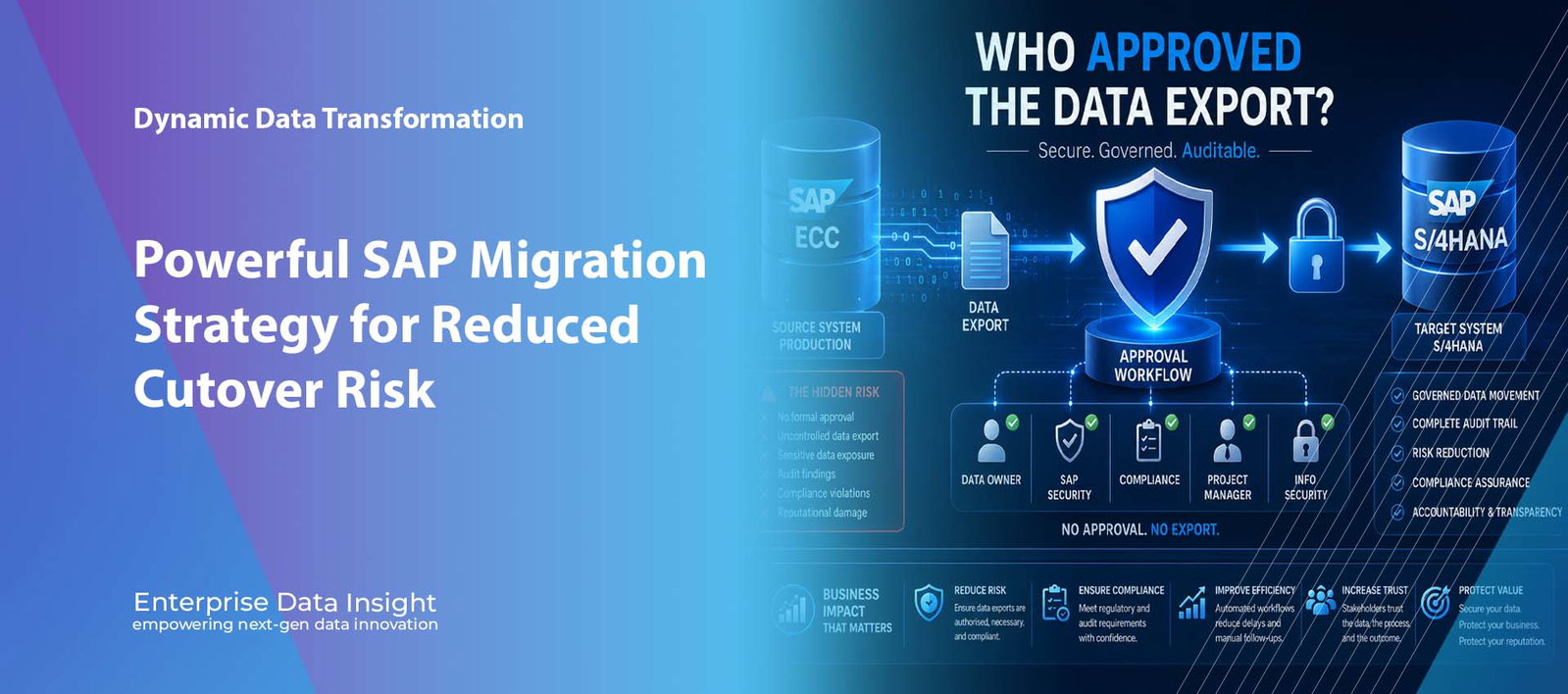
DDR Workflow Approval | SAP Migration Governance | Secure Data Export S/4HANA Data Export Approval: Powerful Governance for Secure SAP Migration S/4HANA Data Export Approval is one of the most overlooked governance controls in SAP transformation programmes. Organisations spend millions securing SAP access, privileged users, segregation of duties, cloud environments, and cyber security, yet many cannot quickly prove who authorised production data to be exported during migration. Dynamic Data Replicator Workflow Approval gives CIOs, CISOs, Data Owners, and audit teams a controlled, documented, and enforceable approval process before sensitive SAP data is extracted, replicated, or moved. No ApprovalNo production export should proceed until the correct business, security, and compliance stakeholders have authorised it. Audit ReadyMaintain evidence of who requested, reviewed, approved, rejected, and executed each SAP data movement. Lower RiskReduce unauthorised exports, unclear ownership, weak governance, and post migration audit exposure. The C level question The critical question is not which tool exported the data. It is who approved production data to leave the source system, what scope was approved, and where that approval evidence is stored. Approval workflowAudit trailData governanceMigration security Explore DDR GovernanceDiscuss Data Export Approval Dynamic Data Replicator Workflow ApprovalS/4HANA Data Export ApprovalControl Production Data Movement Before It StartsPRODUCTION SOURCESAP ECCCustomer dataEmployee recordsFinancial transactionsMaterial and supplier dataAPPROVAL GATERequest. Review. Approve. Audit.Data Owner • SAP Security • ComplianceProject Manager • Business Owner • Information SecurityNo Approval • No Export • Full Audit EvidenceAPPROVED TARGETS/4HANA LandscapeMigration systemTest environmentQuality assuranceProduction cutoverData export is not a technical activity. It is a governed business decision.DDR Workflow Approval helps organisations prove who approved the export, what scope was approved, and when the decision was made.S/4HANA Data Export Approval ensures production data movement is requested, reviewed, approved, documented, and auditable before export execution. S/4HANA Data Export Approval is now a critical governance requirement because every SAP migration begins before data reaches the target S/4HANA system. It begins when production data is extracted from the source environment. That export can include customer records, supplier data, employee information, financial transactions, material master data, purchase orders, sales orders, historical postings, and business partner information. For many organisations, the export is treated as a technical activity. A migration request is raised, a consultant or administrator extracts the data, files are transferred, the target system is populated, and testing begins. From a programme perspective, this may look normal. From a governance, audit, privacy, and cyber security perspective, it leaves a serious question unanswered. Why S/4HANA Data Export Approval Matters The question is simple: who approved the production data export? Not who executed it. Not which tool moved it. Not how quickly it completed. Who authorised millions or billions of records of production data to leave the source SAP system, and where is that approval recorded? For CIOs, CISOs, Data Protection Officers, SAP Security leaders, and audit teams, this distinction matters. Data export is the first security event in a migration programme. Once data leaves the production environment, the organisation becomes responsible for where it goes, who can access it, whether it should be masked, whether the scope was justified, and whether the movement can be defended during an audit. Data export is not a technical task. It is a business decision with security, privacy, compliance, operational, and audit consequences. The Governance Gap Most SAP Programmes Never Address Many SAP S/4HANA migration programmes have strong controls around system access, user roles, privileged accounts, segregation of duties, change management, and production support. However, the same level of control is often missing from the movement of production data into migration environments, test systems, development systems, cloud platforms, or third party project landscapes. A typical programme may struggle to answer: Which business owner approved the export? Which source and target systems were authorised? What data scope was approved? Was personal or commercially sensitive information included? Was masking, scrambling, or minimisation required? Did SAP Security, Information Security, or Compliance review the request? Was the approval documented in a way that can be produced during audit? Can the organisation prove that the export matched the approved scope? If the answer depends on emails, meeting notes, spreadsheet comments, or informal project conversations, the organisation does not have strong governance. It has fragmented evidence and operational trust. Why S/4HANA Migration Increases Data Export Risk SAP S/4HANA programmes often involve more environments, more data copies, more project participants, and more external stakeholders than traditional upgrades. Migration programmes may include cloud infrastructure, sandbox systems, development environments, quality assurance environments, migration staging areas, integration testing systems, user acceptance testing systems, offshore teams, third party consultants, and temporary project access. Each movement of production data increases exposure. Production to sandbox. Production to development. Production to quality assurance. Production to migration system. Production to S/4HANA test. Production to S/4HANA production. Each export should be governed. Each export should have a business reason. Each export should be approved. The Auditor’s Question Imagine an internal audit review six months after go live. The migration has completed. The programme has closed. Consultants have moved on. The audit team asks one direct question: who authorised the export of production customer, vendor, employee, and financial data into the migration environment? If the programme team has to search through emails, ticket comments, project folders, meeting minutes, and chat messages, the governance process has already failed. The issue is no longer whether the migration technically succeeded. The issue is whether the organisation maintained appropriate control over sensitive data throughout the transformation. Weak evidence approval hidden in emails ticket comments without data scope informal project meeting decisions unclear data owner responsibility no link between approval and actual export no complete export audit trail Strong evidence structured export request defined source and target systems approved data scope and justification named approvers and timestamps approval linked to execution audit ready workflow history Data Export Is a Business Decision One of the most common mistakes in migration governance is allowing data export to be treated as an IT execution step. Technical teams should execute approved decisions. They should not be the only
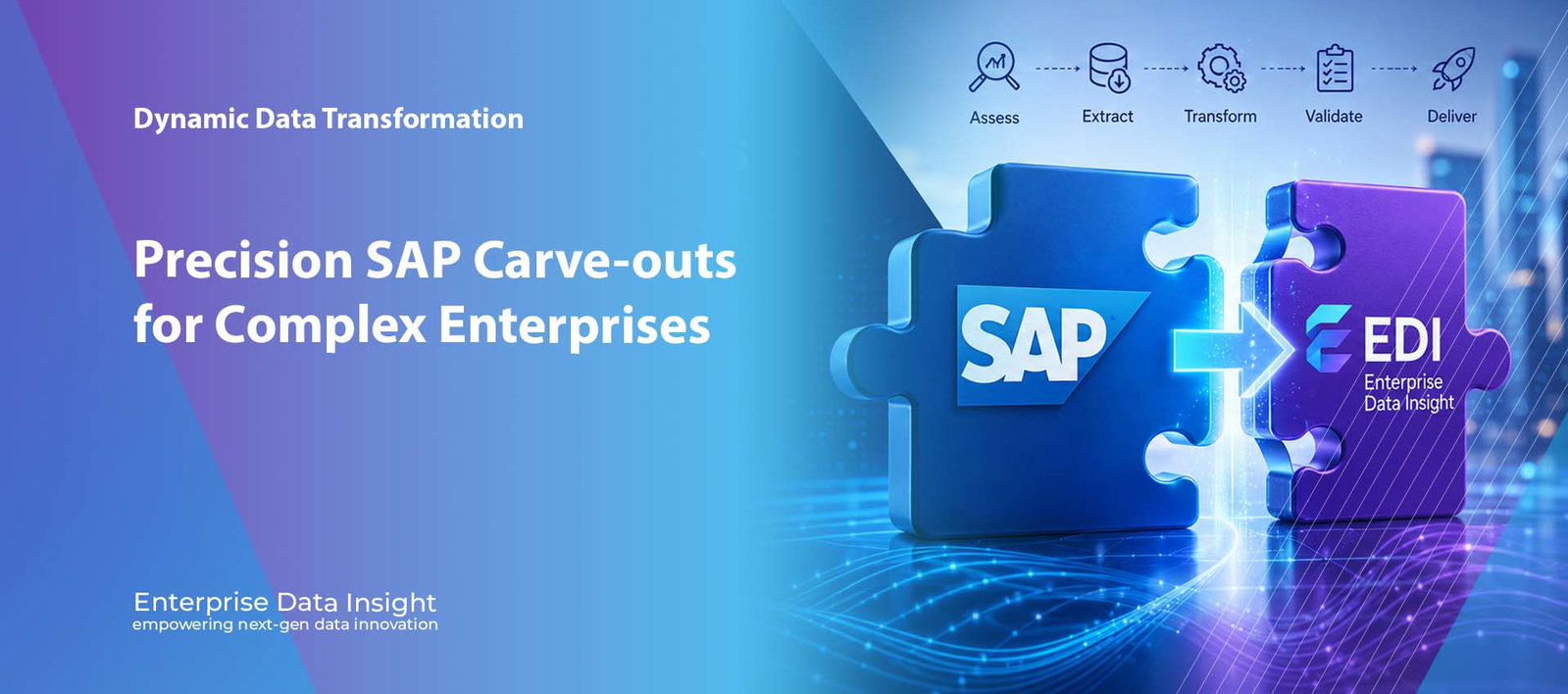
SAP Carve-out | Selective Transformation | Business Continuity SAP Carve-out: Powerful Selective Transformation for Business Separation SAP Carve-out projects are among the most complex transformation programmes an organisation can undertake. A SAP Carve-out requires selective transformation, controlled data separation, validation, reconciliation, governance, and cutover planning so the business can separate legal entities, plants, company codes, or business units without disrupting operations. SelectiveExtract and migrate only the required company codes, plants, business objects, time slices, and organisational scope. ControlledProtect operational continuity with governed execution, validation checkpoints, audit logs, and cutover readiness. ReadySupport divestitures, mergers, acquisitions, legal separations, and SAP S/4HANA transformation programmes. What this solves EDI helps organisations execute a SAP Carve-out without depending on risky full system copies, manual extraction, or uncontrolled data separation. SAP Carve-outSelective transformationData validationBusiness continuity Explore EDI SAP SolutionsDiscuss Your Carve-out Enterprise Data Insight Selective TransformationSAP Carve-out ExecutionSelective Transformation Without DisruptionSOURCE LANDSCAPEExisting SAP EstateECC or S/4HANAshared company databusiness objectshistory and master dataSELECTIVE CARVE-OUT ENGINEScope. Extract. Transform. Validate.Separate only the required legal entity, plant,company code, business process, or object scope.Validation • Reconciliation • Auditability • Cutover ControlTARGET LANDSCAPESeparated SAP EntityNew company systemdivested business unitmigration targetor S/4HANA environmentBusiness continuity is protected when carve-out execution is selective, validated, governed, and auditable.EDI helps SAP teams execute carve-outs with scope control, data integrity, reconciliation, security, and cutover confidence.SAP Carve-out projects require selective scope control, governed execution, validation, reconciliation, and cutover readiness. SAP Carve-out execution requires more than technical data extraction. It requires a controlled transformation strategy that protects business continuity, preserves data integrity, reduces operational risk, and ensures the carved-out organisation can operate confidently from day one. A SAP Carve-out may be triggered by divestitures, mergers, acquisitions, restructuring, joint ventures, legal entity separation, regional operating model changes, or SAP S/4HANA transformation. In every case, the challenge is the same: how do you separate the right business data, processes, and history without destabilising the source organisation or delaying the target business? Why SAP Carve-out Projects Are Difficult SAP systems are deeply interconnected. A company code may be linked to plants, customers, vendors, materials, purchasing history, sales orders, financial postings, open items, pricing conditions, inventory, production data, attachments, interfaces, authorisations, and downstream reporting. This means a SAP Carve-out cannot simply be treated as a data export. It is a selective transformation exercise that must understand business relationships across SAP modules and protect both the retained organisation and the separated entity. master data relationships must remain consistent transactional history must be scoped and validated open items must be reconciled custom tables and enhancements must be assessed interfaces and reporting dependencies must be reviewed security, privacy, and data ownership must be controlled cutover activities must be sequenced to minimise business interruption A successful SAP Carve-out is not about moving the most data. It is about moving the right data, with the right context, at the right time, with the right controls. The Business Disruption Risk Poorly executed SAP Carve-out programmes can create significant disruption. If the scope is incomplete, the target organisation may be unable to transact effectively. If too much data is moved, the programme may increase cost, risk, complexity, and privacy exposure. If validation is weak, business users may lose confidence in the new environment. Common SAP Carve-out risks include: missing master data required for operational continuity incomplete financial balances or open transactions broken document flow across sales, logistics, procurement, or finance incorrect organisational scope selection unplanned downtime during cutover insufficient audit evidence for what was transferred data privacy exposure caused by transferring non relevant records EDI Approach to SAP Selective Transformation Enterprise Data Insight supports SAP Carve-out execution using a selective transformation approach. Instead of relying on full system copies or manual extraction, EDI focuses on defining the precise business scope and executing controlled data separation with validation and governance built in. The SAP Carve-out approach is designed to support complex scenarios such as company code carve-outs, plant separation, regional divestitures, business unit transfers, partial history migration, and SAP ECC to SAP S/4HANA selective transformation. Selective scope definition company code plant sales organisation purchasing organisation business object date or fiscal year custom selection criteria Execution control pre migration assessment dependency mapping simulation and test cycles validation and reconciliation audit logs and exception handling cutover planning post migration verification Selective Data Separation Without Full System Duplication Traditional SAP Carve-out approaches often depend on copying large volumes of data and then removing what is not needed. This can be expensive, slow, and difficult to control. EDI’s selective transformation approach works differently by identifying and transferring the relevant scope from the beginning. This enables organisations to reduce unnecessary data movement, limit privacy exposure, improve target system efficiency, and simplify validation. It also helps reduce the risk of introducing irrelevant or sensitive records into the separated entity. Validation and Reconciliation Are Non Negotiable In a SAP Carve-out, data accuracy is not optional. The target organisation must be able to operate with confidence, and the retained organisation must not be destabilised by the separation. This makes validation and reconciliation essential throughout the programme. EDI supports SAP Carve-out validation across: record counts and completeness financial balances and open items master data relationships document flow and transactional continuity cross module dependencies custom table and extension data exception reporting and remediation Where EDI creates measurable SAP Carve-out value A SAP Carve-out requires a balance of speed, control, data integrity, security, and business readiness. EDI helps organisations reduce disruption by making carve-out execution selective, repeatable, and auditable. FasterReduce dependency on full system duplication by extracting and transforming only the required SAP scope. SaferLimit unnecessary data movement and reduce privacy exposure through selective business scope control. CleanerValidate master data, transactional data, open items, and cross module dependencies before cutover. AuditableMaintain clear evidence of what was selected, transformed, migrated, validated, and reconciled. Common SAP Carve-out Scenarios SAP Carve-out projects can vary significantly depending on the business event and target operating model. Some organisations need a clean separation of a legal entity. Others need a business unit transferred to a new owner. Some
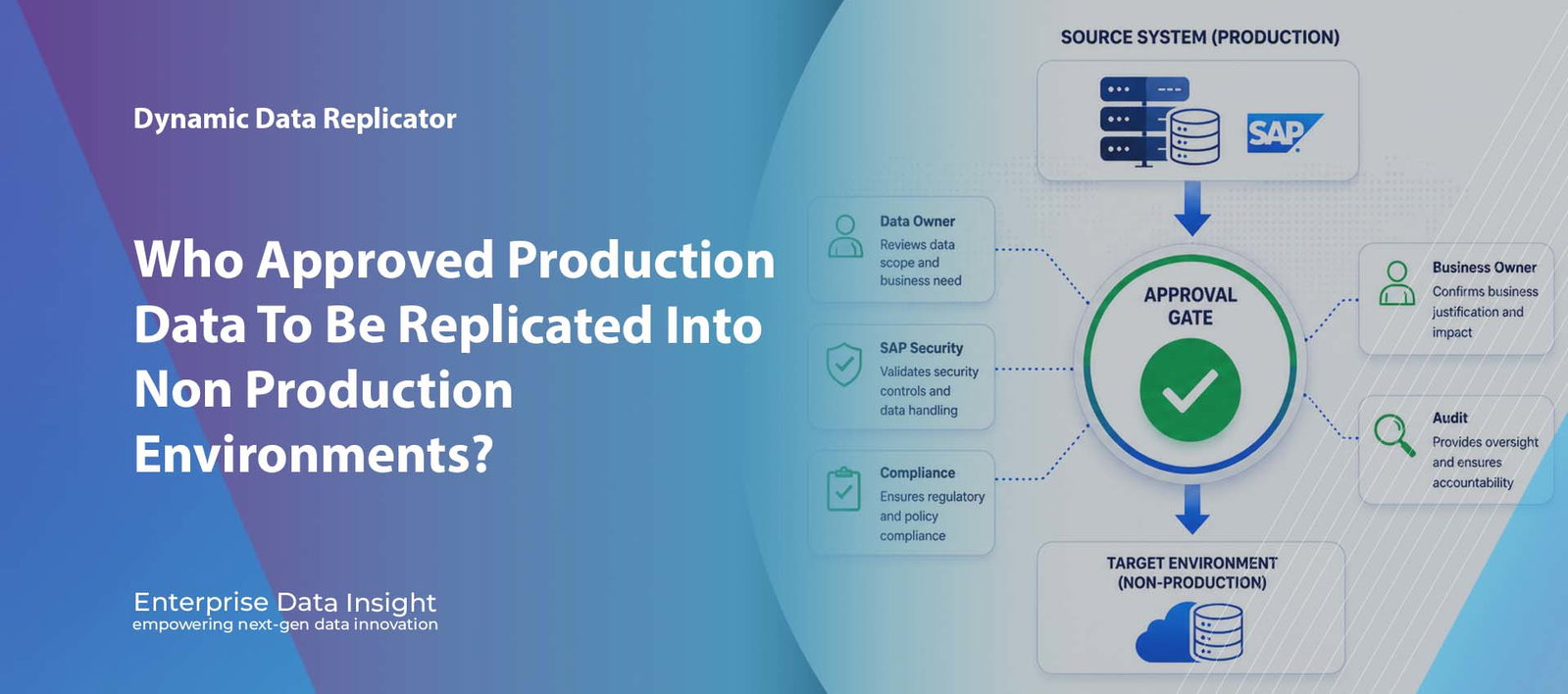
DDR Workflow Approval | SAP Data Governance | Audit Ready Replication Why Approval Before Data Replication Is No Longer Optional Workflow Approval for Data Replication is now a critical control for SAP organisations that move production data into test, development, migration, cloud, transformation, and non production environments. Dynamic Data Replicator introduces approval governance before export execution, ensuring every replication request is reviewed, authorised, documented, and auditable before data leaves the source system. No approvalNo export and no data movement until the required stakeholders have authorised the replication request. AccountabilityCapture who requested the data, who approved it, what scope was approved, and why it was required. Audit readyMaintain evidence of requests, approvals, rejections, comments, execution details, and governance decisions. Executive question The most important question is no longer whether data can be copied. It is who approved the data to leave the source system, and why. Data movement approvalSAP governanceAudit evidenceControlled replication Explore Dynamic Data ReplicatorArrange a DDR Demo Dynamic Data Replicator Workflow ApprovalWho Approved The Data To Leave Production?SOURCE SYSTEMProduction SAPCustomer, employee,financial, supplier, andcommercially sensitivebusiness data.APPROVAL GATENo Approval. No Export. No Data Movement.Replication requests are reviewed by authorisedstakeholders before DDR initiates export execution.Data Owner • SAP Security • Compliance • AuditTARGET SYSTEMControlled TargetTest, development,training, cloud, migration,or transformationenvironment.Govern. Approve. Replicate. Audit.DDR Workflow Approval ensures every data replication request is authorised, documented, and traceable before execution.Workflow Approval for Data Replication gives organisations governance over who approved production data movement, why it was required, and what scope was authorised. For many organisations, data replication has become a routine operational activity. Systems are refreshed, test environments are provisioned, SAP landscapes are migrated, and business data is transferred between environments on a regular basis. However, while organisations invest heavily in securing production systems, a critical governance question is often overlooked: who authorised the data to leave the source system? Many organisations have strong controls around user access, segregation of duties, and production changes, yet limited governance over the actual movement of data between systems. A user requests a refresh. A technical team executes the replication. Data is copied. But where is the approval, accountability, and audit trail? The Governance Gap in Data Replication Every replication activity represents a business decision, not simply a technical task. When data is replicated from a production SAP system into a non production environment, organisations may be transferring sensitive and business critical information. personally identifiable information customer data employee records financial information commercially sensitive transactions intellectual property supplier and partner information In many cases, the volume of data being transferred can be measured in terabytes. Yet organisations frequently lack a formal mechanism to ensure that the appropriate stakeholders have reviewed and authorised that movement. Workflow Approval for Data Replication closes this governance gap by making approval part of the replication process itself. Data Movement Is a Security Event Traditional security programmes focus on controlling access to systems. Modern organisations must also control the movement of data. A data export from a production system is effectively a security event. sensitive information copied to environments with weaker controls excessive data replicated without business justification GDPR and privacy obligations breached lack of accountability for data transfers limited audit evidence during compliance reviews increased exposure to insider threats The question should not only be whether the replication can technically be performed. The question should be whether it should be performed. Workflow Approval Built Into DDR DDR Workflow Approval introduces a governance layer that sits directly within the replication process. Before any export can begin, the replication request must pass through an approval workflow. The process is simple, controlled, and fully auditable. Request source system target system scope of data business objects selection criteria scrambling requirements business justification Review and approval data owners SAP Security teams Information Security compliance teams SAP Basis administrators project managers business process owners Approvers review the request and determine whether the data movement aligns with organisational policies and business requirements. Only after all required approvals have been completed can DDR initiate the export and replication process. No approval. No export. No data movement. Why Executive Teams Should Care For CIOs, CISOs, Data Protection Officers, and Audit Leaders, Workflow Approval delivers far more than operational control. It establishes governance over one of the most sensitive activities within the SAP landscape. Executive value of DDR Workflow Approval Workflow Approval for Data Replication strengthens security, compliance, audit readiness, and executive confidence in how SAP data is moved. GovernedEvery replication request is reviewed and approved before execution. Reduced RiskUnauthorised or unnecessary data transfers can be prevented before they occur. AccountableEvery decision is recorded, timestamped, and attributable to an individual approver. Audit ReadyRequests, approvals, rejections, comments, and execution details are maintained automatically. Supporting Regulatory and Compliance Requirements Organisations face increasing scrutiny regarding how sensitive information is accessed, processed, and transferred. Workflow Approval helps support compliance initiatives by enforcing governance directly within the replication platform rather than relying on emails, spreadsheets, or manual approvals. Organisations are under increasing pressure to demonstrate control over how sensitive data is transferred and processed. Frameworks such as GDPR, ISO 27001, and guidance from SAP continue to reinforce the importance of governance, accountability, and auditability across enterprise data movement processes. GDPR UK Data Protection Act ISO 27001 SOX internal audit programmes cyber security frameworks data governance policies From Technical Process to Business Controlled Process Historically, data replication has been viewed as a technical operation owned by IT teams. Leading organisations are now recognising that data movement is a business governed activity requiring oversight, accountability, and executive visibility. every request is reviewed every decision is documented every export is authorised every action is auditable DDR Workflow Approval transforms replication from a technical process into a controlled business process. The Future of Secure Data Replication As cyber threats increase and regulatory expectations continue to evolve, organisations can no longer afford to treat data replication as a routine background activity. The movement of production data into test, development, training, cloud, migration, or transformation environments must be governed with the same rigour applied to