


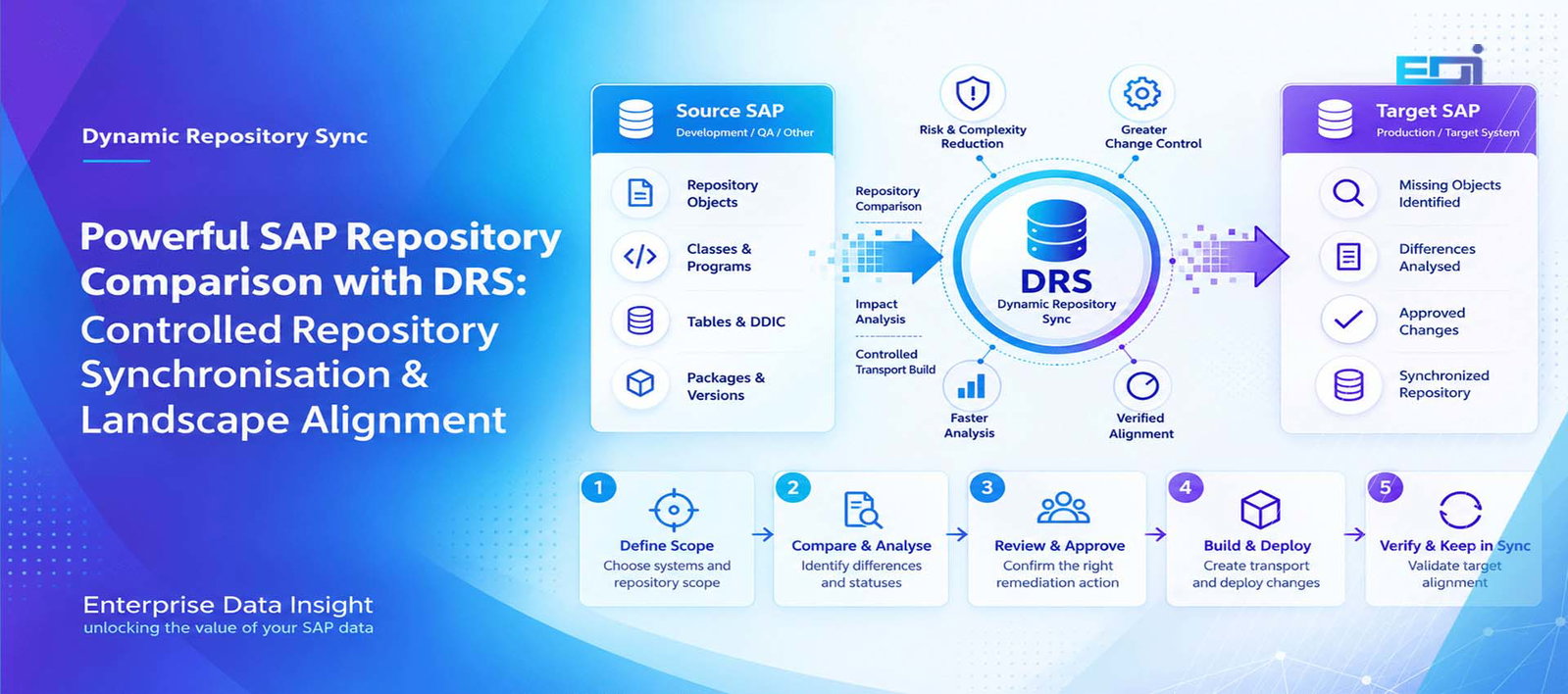
Dynamic Repository Sync SAP Repository Comparison Transport Governance Landscape Alignment Powerful SAP Repository Comparison with DRS: Discover, Control and Keep SAP Systems in Sync SAP repository comparison should answer more than a simple question of whether two objects are different. In a complex SAP landscape, teams need to know which repository objects are missing, which system contains the newer version, where content or package assignments differ, whether an object is inactive, whether a genuine conflict exists and what controlled action should happen next. DRS — Dynamic Repository Sync by Enterprise Data Insight turns that comparison into a governed lifecycle from discovery and impact analysis through approval, transport build, validation, deployment and verified alignment. Published by Enterprise Data Insight Updated 19 September 2026 Topic: SAP Repository Comparison & Change Governance Discover Repository Drift Use SAP repository comparison across a selected Source and Target landscape to surface missing, different, newer, inactive or conflicting repository objects in one controlled result set. Understand the Difference Classify repository status and analyse what the difference means before deciding whether remediation is required. Build with Governance Move approved Source objects into a controlled transport process rather than turning every difference into an automatic overwrite. Verify Alignment Validate after deployment and repeat comparisons on demand or to an agreed schedule so alignment becomes an operating discipline. Explore the DRS lifecycle See DRS comparison statuses AI quick answer What Is SAP Repository Comparison? SAP repository comparison is the process of evaluating selected repository objects across two SAP systems to determine whether those objects are aligned, missing, different, newer in one system, inactive or otherwise inconsistent. DRS extends the comparison into a controlled operating workflow: discover the differences, classify them, analyse impact, review and approve the required action, build the transport, validate the target, deploy, verify the outcome and keep the landscape in sync. Comparison is evidenceThe first result should tell you what differs and in which direction — not immediately assume that one side must overwrite the other. Context is essentialA repository object can be technically different for a valid reason. Impact and ownership should be understood before remediation. Verification closes the loopA transport being imported is not the same as proving the intended repository state is now aligned. Key takeaways DRS means Dynamic Repository Sync and is focused on SAP repository alignment — it is separate from DDR, which focuses on SAP data replication and test data management. DRS uses a Source-to-Target comparison model but does not treat every difference as an automatic Source-wins decision. Statuses such as TARGET_NEWER and CONFLICT are designed to stop teams from blindly overwriting legitimate target-side work. The full DRS lifecycle is DISCOVER → COMPARE → ANALYSE IMPACT → REVIEW/APPROVE → BUILD TRANSPORT → VALIDATE → DEPLOY → VERIFY → KEEP IN SYNC. Technical architecture & governed change flow DRS — Dynamic Repository Sync Technical repository comparison and synchronisation workflow for SAP landscapes — from Source comparison and status classification through governed transport build, deployment and verified Target alignment. SAP Source SAP System Development / Quality / Reference ▤ Repository ObjectsPrograms, function groups, includes, interfaces and related objects. </> Classes & ProgramsABAP classes, reports, function modules and executable objects. DB Tables & DDICTables, views, data elements, domains and Dictionary definitions. ◇ Packages & VersionsPackage assignment, repository metadata and object versions. Compare RFC ConnectionsSecure controlled communication SYNCHRONIZED MISSING SOURCE_NEWER TARGET_NEWER DRS DRS Central Repository comparison, governance and synchronisation control plane 1Template & Scope 2Repository Compare 3Status Classification 4Impact Analysis 5Review & Approve 6Controlled Transport Build 7Validation 8Verification CONTENT_DIFFERENT PACKAGE_DIFFERENT INACTIVE CONFLICT Synchronise Background ExecutionScheduled or on-demand SAP Target SAP System Quality / Production / Target ⌕ Differences IdentifiedNewer, missing, changed, inactive and conflicting repository states. ✓ Approved ChangesReviewed and authorised remediation scope ready for controlled transport. → Transport DeployedApproved repository changes move through the established SAP transport path. ↻ Repository AlignedPost-deployment comparison verifies the intended Target repository state. Governed Change Control 1DiscoverIdentify systems, scope and objects. 2CompareAnalyse repository differences. 3Analyse ImpactAssess dependencies and technical risk. 4Review / ApproveConfirm the correct remediation action. 5Build TransportCreate the controlled transport request. 6ValidateCheck transport contents and readiness. 7DeployRelease approved changes to the Target. 8VerifyConfirm successful repository alignment. 9Keep in SyncRepeat on demand or to a schedule. Enterprise Data Insight DRS turns SAP repository comparison into a controlled, repeatable and verifiable change process. DRS technical workflow: compare Source and Target repository content, classify the difference, analyse impact, govern the remediation decision, build and deploy the approved transport, then verify the resulting Target state. The landscape problem SAP Systems Rarely Drift All at Once — They Drift Object by Object Enterprise SAP landscapes are rarely static. Development continues while projects are running. Emergency fixes are introduced. Parallel workstreams touch related objects. Transports are moved at different times. Test systems are rebuilt. Support teams make corrections. Upgrade activity creates another line of change. Over time, the question is no longer simply whether the systems are connected; it is whether the repository state in those systems still represents the state the organisation expects. That is where SAP repository comparison becomes operationally important. A system can appear healthy while individual repository objects are missing, older, newer, inactive, assigned differently or carrying content that no longer matches the intended landscape path. Those differences can surface later as failed testing, inconsistent behaviour, transport surprises, regression defects or uncertainty before a release. The enterprise issue is not “difference” alone The real risk is an unexplained difference: an object exists in one system but not another, the versions diverge, the package changes, or both sides have legitimate change. DRS is designed to turn that uncertainty into a visible, reviewable and governed decision. The DRS model What Is DRS — Dynamic Repository Sync? DRS — Dynamic Repository Sync is an Enterprise Data Insight solution for comparing repository content between SAP systems, classifying the differences and managing the controlled path from discovery to verified alignment. The comparison can be defined through reusable templates, connected to selected Source and Target systems through RFC destinations and executed on demand or
Orlando, United States
255 S Orange Avenue,
Orlando, FL 32801,
United States