


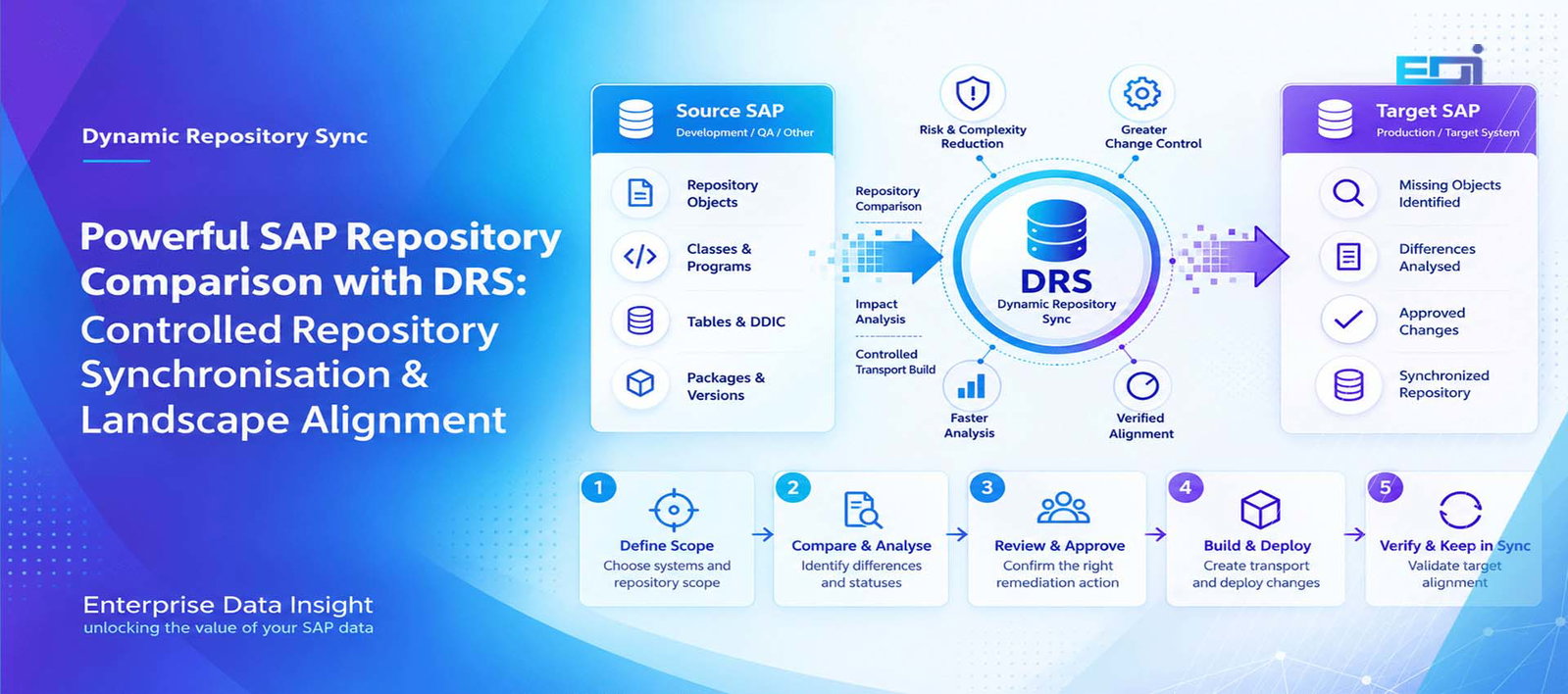
Powerful SAP Repository Comparison with DRS | Enterprise Data Insight
Powerful SAP Repository Comparison with DRS: Discover, Control and Keep SAP Systems in Sync
SAP repository comparison should answer more than a simple question of whether two objects are different. In a complex SAP landscape, teams need to know which repository objects are missing, which system contains the newer version, where content or package assignments differ, whether an object is inactive, whether a genuine conflict exists and what controlled action should happen next. DRS — Dynamic Repository Sync by Enterprise Data Insight turns that comparison into a governed lifecycle from discovery and impact analysis through approval, transport build, validation, deployment and verified alignment.
Use SAP repository comparison across a selected Source and Target landscape to surface missing, different, newer, inactive or conflicting repository objects in one controlled result set.
Classify repository status and analyse what the difference means before deciding whether remediation is required.
Move approved Source objects into a controlled transport process rather than turning every difference into an automatic overwrite.
Validate after deployment and repeat comparisons on demand or to an agreed schedule so alignment becomes an operating discipline.
What Is SAP Repository Comparison?
SAP repository comparison is the process of evaluating selected repository objects across two SAP systems to determine whether those objects are aligned, missing, different, newer in one system, inactive or otherwise inconsistent. DRS extends the comparison into a controlled operating workflow: discover the differences, classify them, analyse impact, review and approve the required action, build the transport, validate the target, deploy, verify the outcome and keep the landscape in sync.
- DRS means Dynamic Repository Sync and is focused on SAP repository alignment — it is separate from DDR, which focuses on SAP data replication and test data management.
- DRS uses a Source-to-Target comparison model but does not treat every difference as an automatic Source-wins decision.
- Statuses such as TARGET_NEWER and CONFLICT are designed to stop teams from blindly overwriting legitimate target-side work.
- The full DRS lifecycle is DISCOVER → COMPARE → ANALYSE IMPACT → REVIEW/APPROVE → BUILD TRANSPORT → VALIDATE → DEPLOY → VERIFY → KEEP IN SYNC.
DRS — Dynamic Repository Sync
Technical repository comparison and synchronisation workflow for SAP landscapes — from Source comparison and status classification through governed transport build, deployment and verified Target alignment.
Secure controlled communication
Scheduled or on-demand
SAP Systems Rarely Drift All at Once — They Drift Object by Object
Enterprise SAP landscapes are rarely static. Development continues while projects are running. Emergency fixes are introduced. Parallel workstreams touch related objects. Transports are moved at different times. Test systems are rebuilt. Support teams make corrections. Upgrade activity creates another line of change. Over time, the question is no longer simply whether the systems are connected; it is whether the repository state in those systems still represents the state the organisation expects.
That is where SAP repository comparison becomes operationally important. A system can appear healthy while individual repository objects are missing, older, newer, inactive, assigned differently or carrying content that no longer matches the intended landscape path. Those differences can surface later as failed testing, inconsistent behaviour, transport surprises, regression defects or uncertainty before a release.
The real risk is an unexplained difference: an object exists in one system but not another, the versions diverge, the package changes, or both sides have legitimate change. DRS is designed to turn that uncertainty into a visible, reviewable and governed decision.
What Is DRS — Dynamic Repository Sync?
DRS — Dynamic Repository Sync is an Enterprise Data Insight solution for comparing repository content between SAP systems, classifying the differences and managing the controlled path from discovery to verified alignment. The comparison can be defined through reusable templates, connected to selected Source and Target systems through RFC destinations and executed on demand or in the background.
The aim is not to make every repository difference disappear automatically. Mature SAP landscapes contain legitimate exceptions. A target may intentionally be newer. An inactive object may be part of work in progress. A package difference may be deliberate. Two systems may have diverged for separate project reasons. DRS therefore treats comparison as the beginning of the decision process rather than the end.
When remediation is approved, selected Source objects can be collected into a transport request, moved through the normal controlled change path and then validated against the Target. This makes DRS a repository synchronisation and governance workflow rather than a blind copy mechanism.
How DRS Extends Repository Comparison into a Governed Enterprise Process
SAP landscapes already provide technical mechanisms for reviewing repository objects, versions and changes. Those capabilities are useful when a developer or technical team needs to inspect an individual object or compare technical content.
DRS addresses the broader operational challenge around SAP repository comparison. It is designed to help organisations move from isolated technical checks to a repeatable enterprise process that can compare an approved landscape scope, classify differences, analyse impact, control remediation and verify the result.
DRS is not positioned simply as another object-difference viewer. Its value is the controlled workflow around repository comparison: scope, compare, classify, analyse impact, review, approve, build transport, validate, deploy and verify.
This gives SAP Basis teams, development leads, release managers and programme teams one governed process for understanding repository drift and deciding what should happen next.
The DRS Lifecycle: Nine Stages from Repository Discovery to Verified Alignment
A useful SAP repository comparison process should be able to explain what happens after a difference is found. DRS is designed around a nine-stage lifecycle so that technical discovery becomes a controlled change process.
DRS Statuses Turn a Large Comparison into an Actionable Repository View
A raw list of objects is not enough. SAP repository comparison with DRS classifies results so SAP teams can quickly separate aligned content from meaningful exceptions. The status model is deliberately directional because the same technical difference can lead to very different decisions depending on whether Source or Target is ahead.
The selected Source and Target object is aligned according to the comparison criteria used for the run.
An expected object is absent on one side of the comparison. The comparison direction and object context determine the required action.
The Source contains the newer relevant version. This may be a candidate for controlled promotion after review.
The Target contains a newer relevant version. DRS should surface this for investigation rather than overwrite it automatically.
The object exists in both systems but the compared content differs in a way that requires analysis.
The object is present in both systems but repository package assignment differs from the expected state.
An inactive repository state is detected and should be understood before it is treated as deployable content.
The comparison identifies a condition where simple Source-to-Target promotion is unsafe or ambiguous and explicit resolution is required.
These statuses make it possible to build filtered work queues around actual risk. A release team may focus on MISSING and SOURCE_NEWER objects for a planned deployment, while an architecture or development lead investigates TARGET_NEWER and CONFLICT results before any transport is built.
Why Impact Analysis Matters Before Repository Synchronisation
The most dangerous SAP repository comparison workflow is one that assumes every difference has an obvious fix. In practice, a single repository object may participate in a much wider technical structure. Program changes can rely on dictionary changes. A function module may be part of a function group. A class may depend on interfaces, data elements or other classes. Package differences can signal organisational or transport-layer implications.
DRS therefore places ANALYSE IMPACT before approval and transport build. The goal is to give technical owners enough context to decide whether the detected difference should be promoted, left alone, investigated further or resolved through another development path.
This is especially important for TARGET_NEWER and CONFLICT results. Those statuses are signals that a Source-wins rule could destroy valid work. Enterprise repository synchronisation should preserve human decision rights where the comparison cannot safely determine intent.
Review and Approval Create a Control Point Between Evidence and Change
DRS separates finding a difference from authorising a change. That separation matters because repository comparison is an evidence-generating activity, while transport creation is a change activity. They should not be treated as the same control.
A review stage allows development leads, Basis teams, release managers or designated approvers to confirm which objects are expected, which are exceptions and which should be remediated. The resulting approved set becomes the controlled input to transport build.
DRS is strongest when the comparison result is used to support a decision. The status tells the team what DRS found; the approval step records what the team intends to do about it.
Build the Transport from the Approved Repository Difference
Once SAP repository comparison has established the approved remediation scope, DRS can collect the selected Source objects into a transport request. This closes a common operational gap between comparison and action: teams no longer have to discover differences in one tool and then manually recreate the object list elsewhere from memory, spreadsheets or screenshots.
The transport remains part of the organisation’s SAP change process. DRS does not need to bypass established controls to be useful. Its value is that the transport content can be derived from a reviewed comparison result and then validated before deployment.
Validation and Verification Are Different — DRS Needs Both
Validation asks whether the proposed change package is appropriate to deploy. Verification asks whether the deployed Target now reflects the intended repository state. Treating these as separate stages gives the DRS lifecycle a clear before-and-after control model.
Before deployment, teams can review the selected objects, statuses and transport content. After deployment, DRS can repeat the relevant SAP repository comparison so the outcome is based on repository evidence rather than the assumption that an import automatically produced the expected state.
This is particularly useful for complex transport chains where an import may technically complete but the final landscape still contains a later Target object, an inactive state, a package inconsistency or another difference that needs attention.
A Central Comparison Model for Source, Target and Controlled Execution
DRS is designed to operate SAP repository comparison from a central SAP system with managed RFC connectivity to the systems being compared. The comparison workflow selects the Source and Target, applies the chosen template and scope, executes the repository comparison and returns the classified result to the central DRS workspace.
Connections can be validated as part of the setup so the comparison is not based on assumed connectivity. For larger runs, DRS can execute in the background and use a configurable level of parallel work processing, allowing comparison volume and system capacity to be balanced rather than forcing every run into a foreground session.
The exact RFC topology should follow the organisation’s security and landscape model. DRS is intended to work with controlled SAP identities and authorisations rather than anonymous access or a hidden bypass around normal SAP governance.
Reusable Comparison Templates Turn One-Off Checks into an Operating Model
SAP repository comparison becomes significantly more useful when the same approved scope can be repeated. DRS templates are designed to capture the comparison definition so teams can select the relevant systems, object scope and execution model without rebuilding the same technical selection every time.
A project may maintain one template for pre-UAT alignment, another for a critical integration area and another for a broader release-readiness check. The template becomes the repeatable unit of control while the actual comparison results remain tied to each execution.
This also supports scheduled comparison. The value is not automation for its own sake; it is early visibility. A recurring comparison can surface repository drift before the drift becomes a late-stage testing or release problem.
Background Execution Matters When Repository Scope Becomes Large
A small SAP repository comparison can be interactive. A broader landscape comparison may contain many object types and large result sets. DRS is therefore designed to support background execution with a configurable number of work processes, allowing the run to be managed according to the capacity and operational policy of the SAP environment.
The performance principle is straightforward: comparison should be scalable without turning the control system itself into a source of disruption. Administrators should be able to choose an appropriate level of parallelism, review run status and return to completed results without keeping an interactive SAP session open for the entire execution.
For enterprise use, run history also matters. A comparison result should have enough identity to support review, audit and later verification rather than becoming a transient screen that disappears as soon as the user leaves the transaction.
A DRS Repository Comparison Scenario Before UAT
Consider an SAP programme preparing a QA system for UAT. The development team believes all required repository changes have reached QA, but several months of parallel delivery, fixes and transport sequencing make that assumption difficult to prove.
Choose the development or approved reference system as Source and the QA system as Target through the configured DRS connections.
Execute the selected DRS template in the background and return a classified object list.
Filter out SYNCHRONIZED results and focus on MISSING, SOURCE_NEWER, TARGET_NEWER, CONTENT_DIFFERENT, PACKAGE_DIFFERENT, INACTIVE and CONFLICT.
Confirm whether each difference is expected, whether dependencies must be reviewed and whether the Source really is the intended authority.
Collect the approved Source objects into the required transport request and pass it through the organisation’s release controls.
After the transport reaches QA, rerun the relevant comparison and confirm that the intended objects now report the expected state.
Enterprise Use Cases for SAP Repository Comparison
Release and UAT readiness
Before a major test cycle or release, DRS can provide an evidence-based view of whether the selected Target repository reflects the expected Source baseline. This reduces reliance on assumptions built from transport lists alone.
Parallel development and project streams
Where multiple teams deliver into related systems, SAP repository comparison can expose repository drift even when each team follows its own process correctly. DRS provides a common comparison view that helps identify where the streams have diverged.
Emergency fixes and hotfix reconciliation
An emergency change can legitimately make a downstream system newer than the normal Source. The TARGET_NEWER status helps surface that condition so the fix can be reconciled deliberately instead of silently overwritten by a later promotion.
System rebuilds and new non-production environments
After a system has been rebuilt, copied or newly introduced, DRS can help establish whether the selected repository scope matches the reference system expected by the project.
Upgrade and S/4HANA programme control
Transformation programmes often create long-running periods in which multiple landscapes coexist. Repository comparison can provide another control point for understanding which custom developments and technical objects have reached which stage.
Post-transport verification
Rather than considering the transport log the final evidence, DRS can compare the resulting repository state and confirm whether the intended object alignment was actually achieved.
Point Comparison vs DRS Repository Synchronisation Workflow
| Question | Point / Manual Comparison | DRS Operating Model |
|---|---|---|
| What is being checked? | Often a known object, version, transport or small technical scope. | A reusable approved comparison scope across a selected Source and Target. |
| How is the result expressed? | Technical difference evidence that the user interprets. | Classified states such as SYNCHRONIZED, MISSING, SOURCE_NEWER, TARGET_NEWER and CONFLICT. |
| What happens next? | The remediation workflow is typically managed separately. | Impact analysis, review/approval, transport build, validation, deployment and verification form one lifecycle. |
| How are risky differences handled? | Depends on the user’s manual investigation and local process. | Directional statuses make target-newer and conflict conditions explicit before transport creation. |
| How is the change package built? | Object lists may need to be recreated manually in a transport. | Approved Source objects can be collected into the transport-building stage. |
| How is success proven? | Often transport/import evidence plus manual checking. | Post-deployment repository comparison verifies the intended Target state. |
| Can it be repeated? | Yes, depending on the native tool and process used. | Templates plus on-demand or scheduled runs support a repeatable keep-in-sync model. |
Repository Synchronisation Needs Auditability, Ownership and Guardrails
An enterprise DRS implementation should make it possible to answer who ran the SAP repository comparison, which Source and Target were selected, which template and scope were used, what statuses were returned, what was approved, which transport was built and whether the Target verified successfully afterwards.
That history is not bureaucracy; it is the evidence chain that turns repository comparison into controlled change. It also gives project and operations teams a shared view of why an object was moved instead of relying on oral history after the event.
Authorisation should follow the same principle. A user who can run a comparison does not automatically need permission to approve remediation or build a transport. Separating those capabilities allows organisations to align DRS with existing Basis, development and release-management responsibilities.
DRS Is Not DDR: Repository Objects and Business Data Are Different Problems
Enterprise Data Insight uses two separate product concepts because the problems are fundamentally different. DRS — Dynamic Repository Sync is focused on SAP repository objects and repository alignment. DDR — Dynamic Data Replicator is focused on SAP business data, selective data replication, test data management and non-production refresh.
| Area | DRS — Dynamic Repository Sync | DDR — Dynamic Data Replicator |
|---|---|---|
| Primary concern | Repository objects, versions, packages, activation state and alignment. | Business data, objects, tables, relationships, filters and target data provisioning. |
| Core question | “Are the required repository objects aligned across systems?” | “What business data should be replicated to the target?” |
| Key workflow | Compare → analyse → approve → build transport → verify. | Select scope → replicate → protect → validate → refresh. |
| Typical outcome | A governed repository remediation and verified system alignment. | A secure, relevant and controlled target dataset. |
For more on Enterprise Data Insight’s SAP data-management portfolio, visit the Enterprise Data Insight solution ecosystem or explore Dynamic Data Replicator.
What DRS Should Not Be Used For
DRS is not a business-data replication engine. If the requirement is to move customer, material, finance, order, HR or other application data into QA or another non-production environment, that is a DDR-type use case rather than a repository synchronisation use case.
DRS should not blindly overwrite TARGET_NEWER or CONFLICT results. Those statuses exist precisely because the intent cannot safely be inferred from version direction alone.
DRS is not a replacement for SAP transport governance. It is designed to make the input to that process more controlled by deriving remediation from comparison evidence and then verifying the repository state after deployment.
DRS should not be used to claim two entire SAP systems are identical. A DRS result is meaningful for the systems, repository scope, object types and comparison criteria included in that run. Enterprise teams should define those boundaries explicitly.
Seven Principles for Enterprise-Grade SAP Repository Synchronisation
First, compare before changing. Repository evidence should exist before a remediation package is created.
Second, keep direction visible. SOURCE_NEWER and TARGET_NEWER are not interchangeable; the direction of drift is part of the decision.
Third, do not hide conflicts. Ambiguous states should become review items, not silent automated overwrites.
Fourth, separate analysis from approval. The person or process that discovers a difference should not automatically authorise the remediation.
Fifth, derive transport content from approved evidence. This reduces transcription errors between comparison and change execution.
Sixth, verify after deployment. Import completion is an event; repository alignment is an outcome.
Seventh, make comparison repeatable. Templates, background execution and scheduled runs turn repository alignment into an operating control rather than an emergency exercise.
DRS and SAP Repository Comparison FAQ
What is DRS — Dynamic Repository Sync?
DRS is an Enterprise Data Insight solution designed to compare SAP repository content between selected Source and Target systems, classify differences and manage a controlled lifecycle through impact analysis, review and approval, transport build, validation, deployment and verification.
What is SAP repository comparison?
SAP repository comparison evaluates selected repository objects across two SAP systems to determine whether they are aligned or whether conditions such as missing objects, version differences, content differences, package differences, inactive states or conflicts exist.
Does SAP already provide repository comparison tools?
Yes. SAP provides repository version management and object-comparison capabilities. DRS is designed as a complementary workflow for broader landscape comparison, status classification, impact review, governed remediation, transport creation and post-deployment verification.
What DRS statuses are used to classify repository differences?
The DRS model includes SYNCHRONIZED, MISSING, SOURCE_NEWER, TARGET_NEWER, CONTENT_DIFFERENT, PACKAGE_DIFFERENT, INACTIVE and CONFLICT. The purpose of the statuses is to make the direction and nature of the difference visible before action is taken.
Does DRS automatically overwrite the Target?
No. DRS is designed around review and approval. In particular, TARGET_NEWER and CONFLICT results should be investigated before any Source-to-Target remediation is approved.
Can DRS build a transport from the comparison result?
Yes. Approved Source objects can be collected into a transport request so the remediation package is derived from the reviewed comparison result rather than manually reconstructed.
Can DRS run repository comparisons in the background?
Yes. The DRS design supports background execution with configurable work-process usage so larger comparisons can be run without keeping an interactive session open for the entire execution.
Can DRS run on demand and on a schedule?
Yes. DRS is designed to support both on-demand and scheduled comparison so teams can use it for project checkpoints as well as recurring keep-in-sync controls.
What is the difference between DRS and DDR?
DRS compares and synchronises SAP repository objects. DDR — Dynamic Data Replicator — focuses on SAP business data replication and test data management. They address different layers of the SAP landscape.
Is DRS a replacement for SAP CTS or transport governance?
No. DRS is designed to complement the established transport process by identifying the repository differences that require action, supporting approval and transport build, and then verifying the resulting Target state.
When is DRS particularly useful?
Typical use cases include release and UAT readiness, parallel development streams, emergency-fix reconciliation, system rebuild validation, S/4HANA or upgrade programmes and post-transport verification.
Know What Changed. Understand the Impact. Verify the SAP Landscape.
DRS — Dynamic Repository Sync turns SAP repository comparison into a controlled enterprise process: discover differences, classify them, analyse impact, approve the right action, build the transport, validate the change and prove the Target is aligned afterwards. This makes SAP repository comparison part of an ongoing landscape-governance model rather than a one-off technical check.